
Agenda by Type A
Not claimedJoin every meeting knowing what you want from it
By Konrad Dabrowski · ProductivityWhy we expect it: A thoughtful Mac meeting companion with clear value, local-only privacy, and plain Markdown notes you control.




In short
Agenda by Type A is a Mac app that shows your meeting notes in a small panel above whatever app you are using during a call. It reads existing calendars from iCloud, Google, and Microsoft 365 with read-only access, and it is hidden from screen sharing and recordings unless you choose to show it. What stands out is that it works fully offline, needs no account, and saves every agenda as a plain Markdown file in a folder you pick.
Summary by Debuts, based on the App Store listing.About
Join every meeting knowing what you want from it.
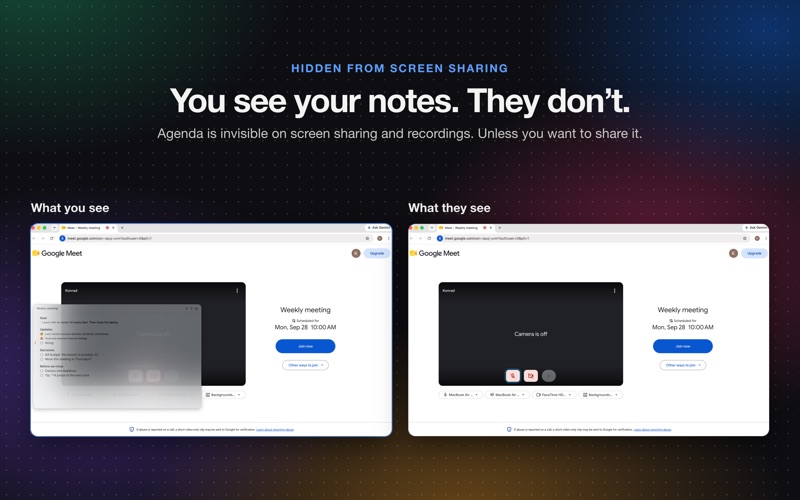
Write notes ahead of every meeting and always be prepared. When the call starts, you can see your agenda as a small panel above whatever app you're on. You see your notes. The people you are sharing your screen with do not.
NO MORE LOST THOUGHTS MID-CALL Keep your points in view without switching windows, digging through notes or glancing at your phone.
HIDDEN FROM SCREEN SHARING Agenda is invisible on screen sharing and recordings. Unless you don't want it to be. Then you can share it.
YOUR CALENDAR, ALREADY THERE Agenda reads the meetings you already have in iCloud, Google, Microsoft 365. There is nothing to re-enter and no account to create. It shows the meetings with other people or a video link, and one click joins the call. Agenda has a read-only access to your calendar.
CONTROLLED FROM THE KEYBOARD Show or hide the panel, move between points, tick the current one, type a quick note or jump to the next meeting, all with shortcuts that work in whatever app is in front. Every shortcut can be customised.
PLAIN FILES YOU OWN Every agenda is an ordinary Markdown file in a folder you choose, and that folder can be your Obsidian vault. Open it, edit it, back it up or search it with any app. If you stop using Agenda, your notes stay exactly where they are.
PRIVATE BY DESIGN Agenda doesn't require an account and doesn't have access to the internet. Everything stays on your Mac. Oh and there is no AI because some things should be written and read only by you.
MADE FOR THE MAC Agenda looks and behaves like a native Mac app: light and dark appearance, adjustable panel transparency, your choice of accent colour, and 12- or 24-hour time.
COMPATIBILITY Compatible with all video call apps including Microsoft Teams, Zoom, Google Meet, Webex, Facetime and more.
Agenda is part of Type A, a family of apps that make you organised.
People rate it
Sign in to rate this app. Honest is what counts.
No ratings yet. Tried it? Be the first to rate it.
More Productivity apps
Best new Productivity apps this week ChickMark: Habit TrackerChickMark is a simple habit tracker for routines, goals, and reminders
 Dayflint: One Thing a DayToo many priorities?
 Snappy Do ItSix connected modes. One traceable journey.
 Fristo CAFMFristo is the app for Fristo CAFM, the facility management software
 UhWhat? Voice NotesCatch the thought before it disappears
- BeginAnywayMorning alarm for hard tasks: set one task, prove you started, build a streak