
AgendaForge Check-In
Not claimedAgendaForge Check-In is the door scanner for events run on AgendaForge
By Spiralsols LLC · Productivity



About
AgendaForge Check-In is the door scanner for events run on AgendaForge. Point the camera at a ticket QR and the guest is checked in. No tap, no second screen, and the line keeps moving.
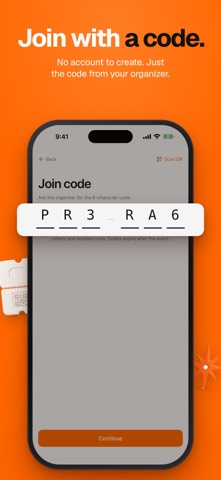
JOIN WITH A CODE There is no account to create. Your organizer makes a join code on the AgendaForge dashboard and hands it to the door team, printed or as a QR. Type the six characters or scan the card, name the device ("Main entrance"), and you are scanning. Organizers approve, rename and remove devices from the same dashboard page, so a phone that leaves the team stops working on its next scan.
SCAN WITHOUT TAPPING The camera stays on. A valid ticket checks in on the spot and a result card slides up: green for in, red for a ticket that was already used (with the time and the door that let them in), amber for a ticket this door cannot take. Every check-in has an Undo for a few seconds, and a stop can be overridden with a recorded reason when staff decide to let someone through.
EVERY GUEST, A FACE Each ticket shows the holder's name, ticket type, company and table, next to a friendly character, or the speaker's own photo. Staff can check the person in front of them against the screen at a glance.
FIND ANYONE IN A SECOND A QR will not scan? Search the guest list by name, email, company or ticket code and check the person in from the same card. You can also type a ticket code by hand.
WHOLE GROUPS, ONE TAP When one person bought for a group, the app shows everyone else on the order. Check them in one by one or all at once.
TABLES AT THE DOOR See a guest's table and seat on their ticket, and seat a walk-in by assigning a table right from the door.
KNOW YOUR DOOR, LIVE The Live screen shows how many people are in, the peak so far, arrivals every fifteen minutes, progress for each ticket type and how many to expect in the next hour.
KEEP SCANNING OFFLINE Venue Wi-Fi drops. Scans keep working against the guest list saved on the device, queue on the phone, and sync on their own when the connection comes back.
SELF CHECK-IN ON AN IPAD Turn an iPad into a lobby kiosk with a kiosk join code. Guests hold up their ticket QR and see a welcome with their first name and table. Groups can check in together, and an optional email lookup helps guests who cannot find their QR. The kiosk stays on one locked screen and only leaves with the organizer's PIN. An iPad can also run as an exit screen that counts people on their way out, so organizers know how many are in the building.
TICKETS FROM ANOTHER SELLER For events that import tickets from another ticketing system, the organizer can let doors accept the seller's own ticket codes too.
BUILT FOR THE DOOR Haptic feedback on every scan, light and dark appearance, keep-awake while the door is open, and an adjustable undo window. The app asks for the camera only to scan tickets and join codes.
People rate it
Sign in to rate this app. Honest is what counts.
No ratings yet. Tried it? Be the first to rate it.