
ArcanaTerm
Not claimedArcanaTerm is a terminal client for working on SSH servers from iPhone and iPad
By Arcana Code Inc. · UtilitiesWhy we expect it: The staging panel that reviews pastes before they reach your server gives SSH users a clear, practical safety benefit.



About
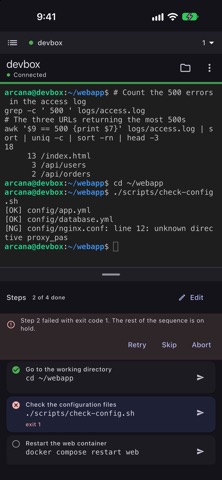
ArcanaTerm is a terminal client for working on SSH servers from iPhone and iPad. Nothing you paste runs until you have seen it: a paste goes into a field below the terminal, where you check and edit it, then send it all at once or one command at a time.
WHY A PASTE SHOULD NOT GO STRAIGHT TO THE SERVER A runbook copied from a web page or a chat carries things that look right and fail: curly quotes where the shell needs straight ones, a dash where an option needed "--", a Markdown code fence, a "$ " prompt copied along with the command. In most terminals a keyboard's predictions and a pasted clipboard go straight to the server before anyone has checked them.
HOW ARCANATERM HANDLES IT Below the terminal is an ordinary text field, the staging panel. Typing and pasting happen there; you review and edit, then tap Send. Return inserts a new line — it never sends. The terminal's own keyboard types plain letters and symbols, and when anything else or several lines are inserted into it they move to the staging panel by themselves. Esc, Tab, Ctrl, Alt and the arrow keys are on a key bar above the keyboard.
TOOLS FOR RUNNING A RUNBOOK SAFELY • Paste inspection: finds typographic quotes and dashes, Markdown code fences, "$ " prompts and full-width spaces, and tells you. It never rewrites anything silently. • Step execution: sends one command at a time, checks its exit code, and stops at the first failure. • Copy output: copies just the previous command's output (OSC 133 shell integration).
JAPANESE, CHINESE AND KOREAN INPUT In most terminals, typing happens on a grid of one character per cell, and text being converted by an input method keeps changing length. In ArcanaTerm it is converted in the staging panel and never passes through the grid, so a runbook with Japanese, Chinese or Korean comments can be pasted and run exactly as written.
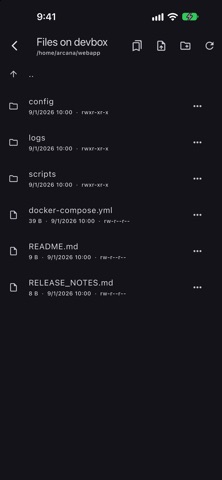
FEATURES • SSH (password, public key, keyboard-interactive) with host key verification; a list of trusted host keys, which can be forgotten • Generate and export ed25519 SSH keys, and install a public key on the server you are connected to • SFTP file browser with a resumable transfer queue and bookmarks (ArcanaTerm Plus) • Port forwarding, jump hosts, HTTP/SOCKS proxies • Shift_JIS and EUC-JP, per host • Snippets, sent history, session logs • Scrollback search, output highlighting, sending to several sessions at once • Long-press to copy or open the menu; pinch to zoom the text • On iPad: hardware keyboards, tabs, Split View and Stage Manager. Portrait and landscape everywhere • Import hosts from an SSH config file; export and import settings to move them from a computer • Themes, fonts and key bindings • Interface in English, Japanese, Chinese (Simplified and Traditional), Korean, German, French and Spanish
FREE, AND ARCANATERM PLUS ArcanaTerm is free to download, and every terminal feature works in the free version. It is not a trial and does not expire. The free version saves up to 5 hosts and 10 snippets. The ArcanaTerm Plus in-app purchase (a one-time purchase) removes both limits and adds the SFTP file browser. Bought on iPhone or iPad, it works on every iPhone and iPad signed in with the same Apple ID. No subscription, no ads, no account.
PRIVACY There is no server of ours. Nothing you type, no host and no credential is ever sent to us. Private keys and passwords are kept in the Keychain on this device only — never synced with iCloud Keychain, never moved to another device.
REQUIREMENTS An SSH server to connect to.
People rate it
Sign in to rate this app. Honest is what counts.
No ratings yet. Tried it? Be the first to rate it.