
Bar Loader
Not claimedType the weight you want on the bar
By Elliot Awin · Health and fitnessWhy we expect it: Clear value for lifters, with thoughtful touches like bar check, gym-specific plate settings and session planning.



In short
Bar Loader is a barbell plate calculator for lifters, judges and coaches. You type a target weight and it shows the plates for one side, in loading order, using the fewest plates and your gym's available sizes. Its standout feature is session planning, which arranges plates across a whole workout to reduce large plate changes.
Summary by Debuts, based on the App Store listing.About
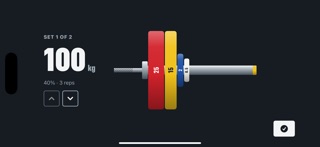
Type the weight you want on the bar. Bar Loader shows you the plates for one side, in the order they go on, heaviest first against the shoulder of the sleeve.
It picks the fewest plates that make the number, the same on both sides, with the collar last.
Both bars Switch between the 20 kg men's bar and the 15 kg women's bar. The drawing changes with it, down to the shorter sleeve and the colour of the ID band.
The plates your gym actually has Tap any size to switch it off, or say how many pairs you have. Missing 2.5s? Only one pair of 25s? The app works around it. The 1.25 kg starts off because it isn't part of an Olympic set, and can be switched on if you have them.
Competition collars Count them at 2.5 kg each, or leave them off for spring clips.
When the number won't work If a total can't be made exactly, you get the nearest load below and above, and an offer to switch on any plate size that would make it exact.
Bar check The loader run backwards. Tap the plates you can see on one side of a bar somebody else loaded and the total follows, drawn in the order you tapped so the picture matches the bar in front of you. For judges, and for anyone walking up to a loaded bar.
Build a session Pick a lift, pick which rep max to work from, set your sets and reps, and put a percentage on each set. Every set shows the weight it asks for and the weight the plates can actually make, because 80% of a 103 kg best is 82.4 kg and you deserve to be told so. Tap a set to see its bar. Tick a set off as you finish it.
Minimise large plate changes Turn it on and the whole session is planned at once so the big plates stay where they are. Coming down from 140 to 120 to 100, it loads the first bar with four plates instead of three, so both drops are plain removals rather than a swap. Less time at the rack, less counting.
Your lifts, and honest estimates Keep a best for one, three, five and ten reps across ten lifts, or add your own. Rep ranges you haven't tested are worked out for you and marked ESTIMATE in blood orange, italic, inside a dashed border. A number somebody lifted never looks like a number nobody lifted. Beat a best while you train and the app offers to store it.
Turn the phone sideways In the loader and in a workout, turning the phone on its side gives you the bar and almost nothing else, big enough to read from where the barbell is. The screen stays awake while it is up. In a workout, swipe to move between sets.
Apple Watch remote Prop the phone by the bar and drive it from your wrist: change the weight, step through your sets, tick one off. The phone stays the display; the watch is the remote.
People rate it
Sign in to rate this app. Honest is what counts.
No ratings yet. Tried it? Be the first to rate it.
More Health and fitness apps
Best new Health and fitness apps this week Orbit: Self-Care Habit TrackerYour healthy choices deserve more than a checkmark
 Wellbeing: Digital WellbeingBillions of people spend more time scrolling than they want to
 Drop LeagueLe vendredi soir, la question tombe toujours : « Tu dis quoi, toi, pour le choc de…
 Aphasia - Speech Therapy AdultFind your words again, a few minutes a day
 Gaia Baby TrackerGaia is a free shared baby log
 Radaa: Baby Feeding TrackerRadaa makes it easy to follow your baby's feeds in the first months — one-handed, and…