
Bear's Color by Numbers
Not claimedA little color
By James Campbell JR · GamesWhy we expect it: A calm, well-organized coloring app with clear free-start pricing, thoughtful accessibility options, and offline play that suits people who love trying new apps.

About
A little color. A little calm.
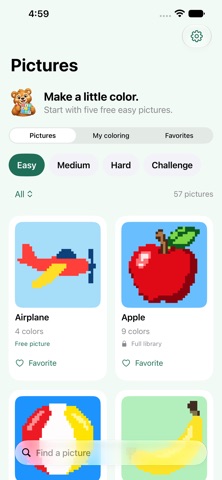
Explore 228 pictures in Bear’s Color by Numbers, with four difficulty levels to match your pace. Start with an Easy picture or settle into a detailed Challenge.
Choose a numbered color, then tap or sweep over matching squares. Other numbers stay untouched. Pinch to zoom, move around with two fingers, and undo your last stroke whenever you need to.
FIND YOUR NEXT PICTURE • Browse and search the library. • Choose Easy, Medium, Hard, or Challenge. • Keep favorites and return to unfinished coloring. • Take on Challenge grids with 90,000 squares.
MAKE IT COMFORTABLE • Switch on Little paws assistance for larger coloring controls. • Choose Quiet Studio for a darker appearance. • Use optional spoken color guidance and gentle haptics. • Filter the palette to see all colors, remaining colors, or colors in view.
START WITH FIVE FREE PICTURES Color the Easy versions of Brown Bear, Butterfly, Frog, Airplane, and Sunflower for free. One optional purchase unlocks the full library of 228 pictures. No subscription.
COLOR AT YOUR OWN PACE No ads, timers, lives, or account to create. Pictures are included in the app for offline coloring. Your progress saves on your device so you can pick up where you left off.
Available for iPhone and iPad. Coloring progress is stored locally and does not sync between devices. Restoring a purchase restores library access, not saved coloring.
People rate it
Sign in to rate this app. Honest is what counts.
No ratings yet. Tried it? Be the first to rate it.