
Breezecut: Video Toolkit
Not claimedShrink a video to send it, protect your work with a watermark, add subtitles to a…
By 文杰 饶 · Photo and videoWhy we expect it: Clear, practical value with strong privacy messaging, a broad toolkit, and no watermark or ads, though it has no ratings yet.




About
Shrink a video to send it, protect your work with a watermark, add subtitles to a talking clip, or turn a landscape video into a vertical one — without opening a complicated editor.
EVERYTHING STAYS ON YOUR IPHONE Videos, photos and audio are never uploaded. Speech recognition and enhancement run on device. No app watermark, no ads.
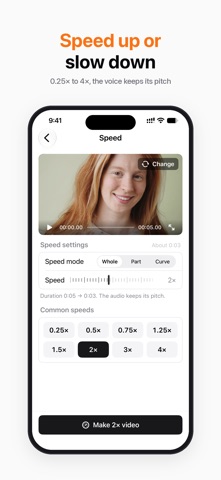
EDIT • Compress: HEVC / H.264 presets, with before and after sizes • Merge: join clips with dissolve, dip to black or slide transitions • Trim: drag the handles, frame accurate • Resize canvas: 9:16, 1:1, 16:9 and more, with a blurred background fill • Split Screen: two videos side by side or stacked • Speed: 0.25× to 4×, audio keeps its pitch • Rotate & flip, reverse, fade in and out • Slideshow: turn photos into a video with music • Convert: MP4 / MOV, re-encode to H.264 or HEVC
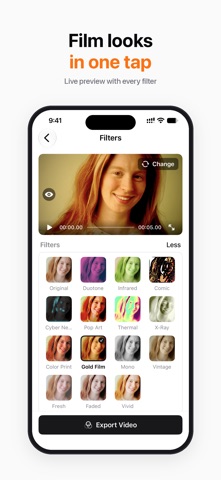
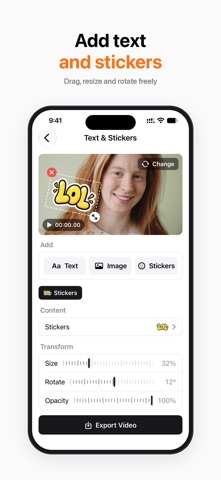
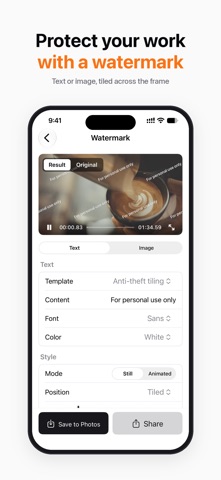
PICTURE & SUBTITLES • Enhance: remove noise and sharpen in one tap • Filters: 15 looks including film, comic and neon, plus brightness, contrast and warmth • Text & Stickers: add text, images and stickers, or blur faces and license plates • Face Blur: finds faces automatically and keeps them pixelated as people move • Device Mockup: put your video in a phone, tablet or laptop frame • Watermark: text or logo, including a tiled pattern • Auto Subtitles: speech to subtitles, editable line by line, burned in or exported as SRT • GIF maker, Live Photo maker, frame grab, media info
AUDIO • Add Music: background music with separate volume for the original audio • Extract audio, mute • Ringtone maker: up to 30 seconds, ready for iPhone
PRO Enhance, Auto Subtitles, Face Blur, Device Mockup and Split Screen are Pro tools. Each can be tried once for free; every other tool is free. Monthly and Yearly are auto-renewable subscriptions; Lifetime is a one-time purchase. Payment is charged to your Apple Account at confirmation of purchase. A subscription renews automatically unless auto-renew is turned off at least 24 hours before the end of the current period. Manage or cancel in Settings → Apple Account → Subscriptions.
Terms of Use: https://www.apple.com/legal/internet-services/itunes/dev/stdeula/ Privacy Policy: https://jackyrwj.github.io/vidbox-support/en/privacy.html
People rate it
Sign in to rate this app. Honest is what counts.
No ratings yet. Tried it? Be the first to rate it.