
CabbyCut
Not claimedBuilding your own cabinets?
By Dylan McCaffrey · Utilities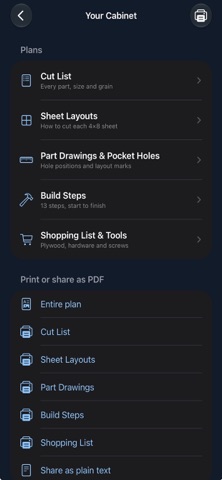

About
Building your own cabinets? CabbyCut turns three measurements into a detailed set of build plans.
Tell it what you're building (a base, wall or tall cabinet), enter the overall width, height and depth in inches, and choose a door or 1 to 8 drawers. CabbyCut works out every part, lays out every sheet of plywood and writes the build steps, from checking your plywood to hanging the cabinet on the wall.
WHAT YOU ENTER
Cabinet type: base, wall or tall Width, height and depth (fractions like 34 1/2 are fine) A door or drawers, and how many drawers Back thickness: 1/4", 1/2" or 3/4" Toe-kick base on or off (base and tall cabinets) Or start from a preset: base cabinet, sink base, vanity, wall cabinet or pantry
WHAT YOU GET
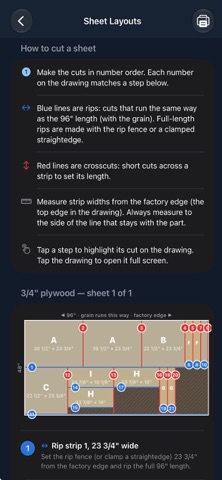
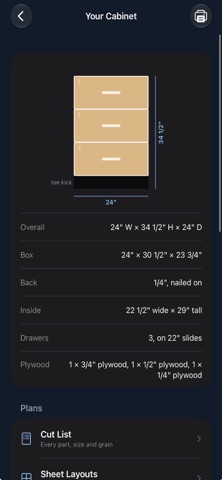
Front view drawing of the finished cabinet with its overall dimensions Cut list: every part lettered A, B, C…, with its size, material, grain direction, edge banding and pocket-hole count Sheet layouts: each 4×8 sheet of 3/4", 1/2" and 1/4" plywood drawn out, with rip-then-crosscut instructions and blade kerf allowed for Part drawings: every part drawn to scale with its pocket holes (position, face and edge), edge banding, and layout marks for shelves, drawer slides, hinge plates and hinge cups Build steps: start to finish, with check-off circles so you can track your progress in the shop Shopping list: plywood sheet counts, pocket screws (counted), hinges or drawer slides (sized to fit), pulls, brads, edge banding by the foot and glue, plus a tools list Print or share as PDF, drawings included, for the whole plan or any one section. Plain-text sharing too.
FREE AND PRO The front view, cut list and build steps are free for every cabinet you plan. CabbyCut Pro is a one-time purchase, not a subscription, and adds sheet layouts, part drawings with pocket holes, the shopping list, and printing and sharing.
HOW YOUR CABINET IS BUILT CabbyCut plans a frameless, European-style box of 3/4" plywood joined with glue and pocket screws. There's no face frame, so everything comes out of sheet goods.
Sides run full height; top, bottom and shelves fit between them Your choice of back: 1/4" nailed on with a hanging rail, 1/2" nailed on, or 3/4" set in and pocket-screwed Optional 4" toe-kick base, set back 3" Full-overlay doors and drawer fronts with even 1/16" reveals and 1/8" gaps One door up to 24" wide, a pair above that, on 35 mm concealed hinges, with the hinge count set by door height Fixed shelves added automatically in door cabinets Drawer boxes of 1/2" plywood with 1/4" bottoms, on full-extension ball-bearing side-mount slides, with the slide length picked to fit your depth
BUILT FOR THE SHOP
Simple: one screen of inputs, no account, no sign-up Works offline: everything is calculated on your device Private: CabbyCut collects no data Works on iPhone and iPad
Measure twice, plan in seconds, and check every number before you cut.
People rate it
Sign in to rate this app. Honest is what counts.
No ratings yet. Tried it? Be the first to rate it.