
CameraMax: Recreate Any Photo
Not claimedCameraMax puts a reference photo directly on your viewfinder, so you can line up a shot…
By Alexandru Zanfir · Photo and video


About
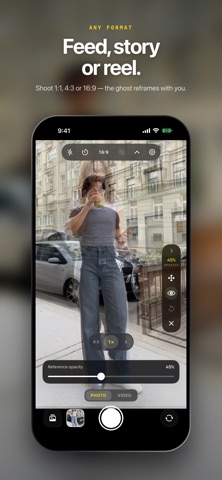
CameraMax puts a reference photo directly on your viewfinder, so you can line up a shot instead of guessing at it.
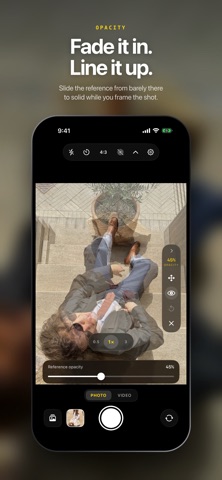
Pick any photo from your library — a shot you saved from a creator you follow, a frame from a trip you want to redo, an old photo you want to retake in the same spot. It appears ghosted over the live camera at 30% opacity. Move until the live scene lands on top of the reference, then shoot.
THE OVERLAY • Any photo from your library becomes the reference • Opacity from a faint guide to a near-solid ghost • Pan, pinch and rotate the reference to fit the frame • Crop before you apply, or use the photo as it is • Hide it with one tap when you want a clean view • Reset the transform whenever it drifts
A REAL CAMERA, NOT A FILTER APP • Every lens your iPhone has — ultra wide, wide, telephoto • Pinch to zoom, tap to focus, exposure compensation to ±4 EV • 1:1, 4:3 and 16:9, switchable while you compose • Flash, timer, grid, horizon level • Live Photos and video recording • Front and back camera
CLEAN CAPTURE Minimal processing is the default. Your photo is saved close to what the sensor and lens actually delivered — no face re-lighting, no aggressive smoothing, no look baked in by the app. Prefer the system look? Switch to Full processing in Settings.
BUILT LIKE A TOOL The camera is the whole app. No feed, no account, no sign-up. Controls sit within thumb reach and get out of the way of the picture. Nothing leaves your phone — CameraMax has no network connection at all, collects no data, and shows no ads.
People rate it
Sign in to rate this app. Honest is what counts.
No ratings yet. Tried it? Be the first to rate it.