
CapExplorer
Not claimedCapExplorer is a 3D model of an AI data center that you can take apart, piece by piece…
By Lokesh Gangaramaney · FinanceWhy we expect it: Its piece-by-piece breakdown of a data center makes complex AI spending easy to explore and understand.


In short
CapExplorer is a 3D model of an AI data center that lets users take a server rack and its surrounding hall apart piece by piece to see how the spending is split. It is aimed at people who want to understand how AI infrastructure is built and paid for, and it is explicitly educational rather than investment advice. One notable feature is that each part lists the publicly traded companies that make it, with links to their latest filings.
Summary by Debuts, based on the App Store listing.About
CapExplorer is a 3D model of an AI data center that you can take apart, piece by piece, to see where the money goes.
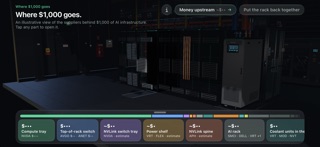
Start at a single AI server rack. Tap "See where $1,000 goes" and the rack pulls apart into its parts, each labelled with its share of $1,000 of data center spending and the companies that supply it. A bar along the bottom shows the whole split at a glance.
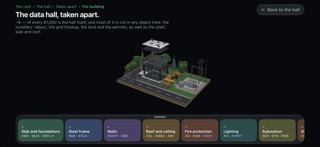
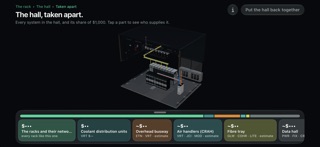
HOW YOU EXPLORE • The rack: compute trays, switches, the power shelf, the copper spine and the rack itself, each with its dollar share. • Inside the parts: open a compute tray to see its GPUs, memory, CPUs, boards, cold plates and network cards, then follow the chips back to the fab and the lithography machine that prints them. • The money upstream: a flow diagram of the spending that is already inside the $1,000, from chipmakers to the toolmakers and software vendors they pay. • The data hall: step back to see the hall around the rack, then take it apart: coolant units, overhead busway, air handlers, containment and fibre tray. • The hall's systems: each one opens in its own level, from the pumps and heat exchanger of a coolant unit to the switchgear, UPS, transformers and generators behind the busway. • The building and the site: zoom out to the whole building on its plot, with slab, steel frame, walls, roof, substation and an excavator at work, and see how much of the cost is labour, land, permits and the grid connection rather than equipment.
WHO GETS PAID Every part lists the publicly traded companies that make it, by ticker. Companies listed outside the US are shown by the symbol a US investor would use and marked as ADRs or foreign listings. Open a company to see its latest annual revenue and profit, with a link to the filing it comes from.
SOURCED FIGURES The dollar figures are illustrative estimates built from cited public sources: company filings, teardown and bill-of-materials analyses, and industry research. Every panel lists its sources, and estimates are marked as estimates, with a range where one is available. The model shows one plausible split of spending; real projects vary.
EDUCATIONAL, NOT ADVICE CapExplorer is an educational tool for understanding how AI infrastructure is built and paid for. It is not investment advice, and it does not recommend buying or selling any security. Company names and tickers are shown for identification only; CapExplorer is not affiliated with or endorsed by any of the companies it mentions.
PRIVATE AND OFFLINE • Works fully offline: the models and data are in the app. • No account, no sign-in. • No ads, no analytics, no tracking. No data is collected.
Built for iPad in any orientation and iPhone in landscape
People rate it
Sign in to rate this app. Honest is what counts.
No ratings yet. Tried it? Be the first to rate it.
More Finance apps
Best new Finance apps this week NjukiYour rent should do more than pay for where you live
 Inflation WatchInflation Watch turns official price data into plain English
 uOwe: Split Bills & BudgetuOwe keeps shared costs fair and your own money clear
 Debtless: Debt-Free by WhenYou are about to know when you will be free
 Pace: Daily Budget & SpendPace turns your monthly budget into one calm number: what you can spend today
 Spending ReviewSpending Review is the grocery total you keep with one hand, with the trolley in the…