
Card Centering Check
Not claimedCard Centering Check measures how well the front of a trading card is centered
By Jinfei Shi · Utilities



About
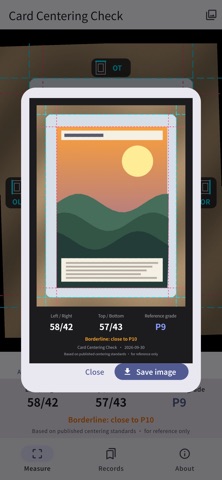
Card Centering Check measures how well the front of a trading card is centered. Pick a photo and the app finds the card's outer edges and artwork border, then shows the left/right and top/bottom border ratios with a reference grade.
AUTO DETECT • Finds the card's outer edges and artwork border and places 8 guide lines for you. • Straightens slightly tilted photos automatically.
FINE-TUNING • Drag the handles to adjust any line; a magnifier follows your finger. • Tap a handle and nudge the line 1 pixel at a time. • Pinch to zoom up to 8×, and rotate the photo in 0.1° steps.
CLEAR RESULTS • Live left/right and top/bottom ratios and a reference grade. • A "borderline" hint when a ratio is just past a grade boundary.
RECORDS • Save a measurement with a note, such as the card name. • Sort by date or grade to pick the cards worth submitting.
RESULT IMAGE • Create an image with the guide lines, ratios and grade, then save it to Photos or share it.
PRIVATE BY DESIGN • Works fully offline. No sign-up, no tracking. • Your photos are processed only on your device and are never uploaded or saved.
The reference grade is calculated from published centering standards and is for reference only; it is not an actual grade. This app is not affiliated with any card grading company.
People rate it
Sign in to rate this app. Honest is what counts.
No ratings yet. Tried it? Be the first to rate it.