
CCTV Calc Design Studio
Not claimedCCTV Calc Design Studio plans a security camera system the way an installer does: how…
By Ryan Hudgeons · UtilitiesWhy we expect it: A focused, privacy-first planning tool that installers would genuinely use for storage, PoE and lens design.





In short
CCTV Calc Design Studio is a planning utility for security camera systems. It estimates NVR storage and bandwidth, checks whether PoE runs and switch budgets hold, and works out lens coverage using DORI levels. It works offline with no account, and installers planning jobs are its audience. A standout detail is that every report carries a fingerprint, so a printed copy can later be checked for changes.
Summary by Debuts, based on the App Store listing.About
CCTV Calc Design Studio plans a security camera system the way an installer does: how much storage the NVR needs, whether every PoE run will hold, and which lens covers the scene. It works offline, needs no account, and nothing you enter leaves your device.
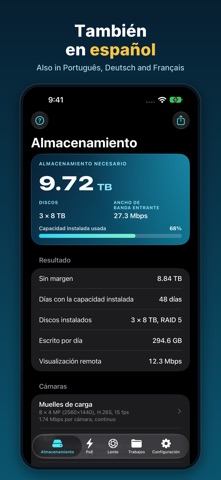
STORAGE AND BANDWIDTH • Enter cameras by group: 1 to 16 MP and multi-sensor cameras, H.264, H.265 or smart codecs, frame rate, scene, and continuous, motion or scheduled recording. • Get the terabytes for your retention, the drive count for any drive size with RAID 1, 5, 6 or 10, the incoming bandwidth and the remote-viewing bandwidth. • Already have the NVR? Enter its installed capacity and see how many days it holds. • Know a camera's configured bitrate? Enter it, and the app uses your number.
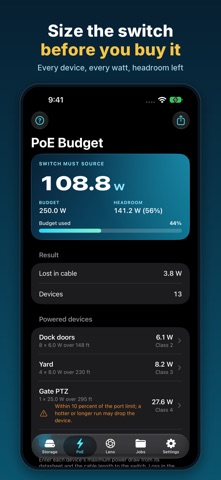
POE BUDGET • Each device's draw and cable length give the power the switch port must source, the voltage at the device, the loss in the cable and the IEEE 802.3af, at or bt class. • See the switch budget used and the headroom left, the longest cable run each device can take on Cat5e, Cat6 or CCA, and a warning before a run fails. • Add the NVR's load and a UPS battery to get the backup runtime.
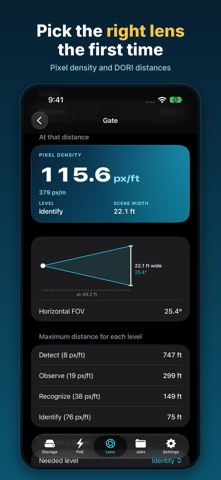
LENS AND COVERAGE • From the datasheet's field of view, or the sensor and focal length: the scene width, pixels per foot and per meter, and the DORI level (IEC 62676-4) at any distance. • Work backwards: the lens that reaches Detect, Observe, Recognize or Identify at a given distance. • A sketch of the field of view, and the farthest distance for every DORI level.
JOBS AND REPORTS • Save jobs on the device, and keep your own cameras in My cameras, ready for any job. • Share a report as text, PDF or CSV, in the customer's language. • Every report carries a fingerprint, so you can check later that a printout wasn't changed.
MADE FOR THE FIELD • Feet or meters, light or dark, and three themes: Night Ops, Hi-Vis and Thermal. • English, Español, Português, Deutsch and Français. • A how-to page for every screen. • iPhone and iPad.
PRIVATE BY DESIGN No account, no ads, no analytics and no network connections. Your jobs stay on your device.
CCTV Calc Design Studio is a planning tool. Bitrates are typical values unless you enter the camera's configured bitrate; PoE follows the IEEE 802.3 limits with DC cable loss; DORI levels follow IEC 62676-4. Check the datasheet for the model you install.
People rate it
Sign in to rate this app. Honest is what counts.
No ratings yet. Tried it? Be the first to rate it.
More Utilities apps
Best new Utilities apps this week Drainly: Speaker CleanerMuffled speaker after a splash, rain, or a sweaty workout?
 Photo & PDF Resize: KBFile too large to upload?
 Arvectum Proxy LauncherArvectum Proxy Launcher is a network utility that routes your iPhone through a proxy you…
 Look Twice: Scam & AI CheckLook twice before you click
 Vodoalarm: vodostaji BiHVodoalarm javlja kad tvoja rijeka naglo raste, pa ne moraš stalno gledati vodostaje
 Ham Radio IQHam Radio IQ answers one question: which band is open right now, from where you are, and…