
Charging Animation Vibe
Not claimedMake your iPhone feel different
By Shruti Kapuriya · LifestyleWhy we expect it: Clear value across charging animations, widgets, slideshows and wallpapers, backed by a careful privacy story and thorough description.




About
Make your iPhone feel different.
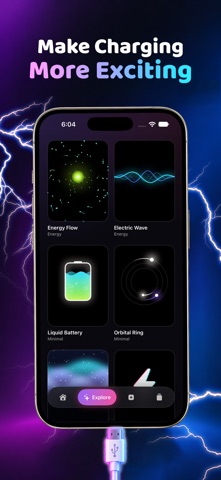
CHARGING ANIMATIONS Pick from 10 animations — neon rings, lightning, aurora, liquid and more — and tune the colors, intensity and sound. Set up a quick Shortcuts automation once (Charging Animation Vibe walks you through it in under a minute) and your animation opens whenever you plug in. It also shows on the Lock Screen and in the Dynamic Island as a Live Activity on supported iPhones.
HOME SCREEN WIDGETS Show your charging look on the Home Screen in small, medium or large, with your battery level. Widgets follow the animation you pick in the app, or choose a different one for each widget. A built-in guide shows you how to add them.
PHOTO SLIDESHOWS Choose 5–30 photos, reorder and crop them, and add effects like Ken Burns, zoom, blur and RGB split. Add a beat made in Charging Animation Vibe that's free to post anywhere, or use your own audio and pick the part of the song you want. Export in 1080p, ready for Stories, Reels and TikTok.
ISLAND WALLPAPERS 33 wallpapers in 11 styles, each designed around the Dynamic Island or notch of your iPhone. Preview them on a Lock Screen mock-up, then save a still image at your screen's exact resolution. Add our free shortcut once and set a saved wallpaper in one tap, or follow the step-by-step guide.
YOUR LIBRARY Every video and wallpaper you save lands in your Library. Favorite, rename, duplicate, share or save to Photos.
YOUR STYLE Dark, light or match your iPhone, plus five accent colors.
PRIVATE BY DESIGN No account. Charging Animation Vibe only sees the photos you pick, and can only add to your photo library, never read it. Everything is made on your iPhone.
Good to know • The charging animation needs a Shortcuts automation that you create once; iOS doesn't let apps start on their own when you plug in. Full-screen playback works while your iPhone is unlocked. • iOS wallpapers are still images. The motion in the wallpaper preview is inside Charging Animation Vibe only. • Apps can't set your wallpaper. The one-tap option uses a shortcut you add to the Shortcuts app.
People rate it
Sign in to rate this app. Honest is what counts.
No ratings yet. Tried it? Be the first to rate it.