
Chicken Bank: Budget Tracker
Not claimedChicken Bank is a private money book for iPhone, iPad and Mac
By Salman Alfariesh · FinanceWhy we expect it: Strong privacy-first budgeting pitch with flexible capture methods, clear value, and careful on-device processing details.




In short
Chicken Bank: Budget Tracker is a private money book for iPhone, iPad and Mac that records spending by typing, voice notes, receipt photos or PDF statements, with every reading returned as drafts to review before saving. It suits people who want to track personal, household or business money offline, with data encrypted on the device. One notable point is that no account is required and no analytics or tracking are used.
Summary by Debuts, based on the App Store listing.About
Chicken Bank is a private money book for iPhone, iPad and Mac. Write down what you spend the way it happened — type it, say it, or snap the receipt — and see where your money really goes. No account, no sign-in, nothing uploaded.
CAPTURE THE WAY IT HAPPENED • Type or paste a sentence like “lunch 84,000 and a taxi home 32,500” and get separate entries with payees, amounts and categories. • Record a voice note and have it read into entries. The recording is deleted once it has been read. • Take a photo of a receipt or choose one you already have. The total is told apart from subtotal, tax, tip and change. • Open a PDF statement or invoice. It is read page by page, and balances and totals stay out of your entries. • Every reading comes back as drafts for you to review. Nothing is added to your book until you save it.
READ ON YOUR DEVICE Reading uses Apple’s on-device models where your device supports Apple Intelligence, and Chicken Bank’s own rules everywhere else. Your documents, photos and voice never leave your device. Which languages can be read depends on Apple’s models for your device and region. Manual entry always works, online or offline.
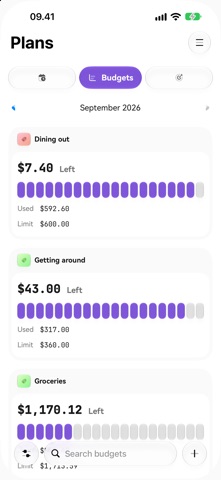
A BOOK FOR EACH PART OF YOUR LIFE • Separate books for personal, household and business money, each with its own reporting currency and time zone. • Wallets for cash, bank accounts, savings, credit cards, loans and other assets or liabilities. • Splits, transfers, refunds, categories with groups, and tags. • Budgets by week, month or year, savings goals, and recurring bills you record, skip or pause. • Keep track of money you lent to or borrowed from people. • Reports: income and spending over six months, spending by category, payee and tag, and what you own and owe at each month’s end. • Every correction keeps its history, so you can see what changed and when.
PRIVATE BY DESIGN • Works offline from the first launch. • Amounts, payees and notes are encrypted on your device with a key kept in its keychain. • Optional app lock with Face ID, Touch ID or your passcode. • Encrypted backup protected by a recovery key only you hold; restore it on your other devices. • Export entries and monthly reports as CSV. • No analytics, no advertising, no tracking.
MADE FOR EACH DEVICE Quick capture on iPhone, a roomy layout on iPad, and a sidebar, sortable tables, menus and keyboard shortcuts on Mac. In English, Arabic, Indonesian and Spanish.
Support: support@chickenbank.app Privacy policy: https://chickenbank.app/privacy Terms of use: https://chickenbank.app/terms
People rate it
Sign in to rate this app. Honest is what counts.
No ratings yet. Tried it? Be the first to rate it.
More Finance apps
Best new Finance apps this week NjukiYour rent should do more than pay for where you live
 Qwiky AIQuiky AI helps you understand and organise your everyday finances in one clear place
 Set Aside for TaxFreelance money arrives without anything taken out of it
 MidRate: Currency ConverterMidRate converts at the mid-market rate, the midpoint between what banks buy and sell a…
 MesuraMesura answers one question: how much can I safely spend before my next pay?
 Inflation WatchInflation Watch turns official price data into plain English