
Chio: One-Tap Expense Tracker
Not claimedMost of what you spend today, you also spent last week
By Thanh Ha · FinanceWhy we expect it: Chio's learned suggestions, pinned tiles and home screen widgets make logging spending feel effortless, a strong debut for finance fans.


About
Most of what you spend today, you also spent last week. Chio notices that, and guesses what you're about to log.
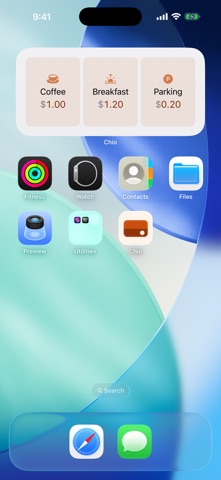
Coffee at 8, lunch at noon, the ride home: Chio learns the times and days you usually log and puts the right tile first. Tap it and it's recorded. No form to fill, nothing to type, no category to hunt for.
— ONE TAP, MOST OF THE TIME — • Suggested tiles follow the hour and the day of the week, based only on what you have logged before • Items that always cost the same, like your usual coffee, are logged in a single tap • Items whose amount varies open the number pad, with a typical amount ready • Income is learned by day of the month, so payday shows up on its own • Tapped the wrong one? The Recorded bar lets you change the amount or undo, right away
— PINS THAT NEVER MOVE — • Pin up to 4 items you log all the time • Pinned tiles stay exactly where you put them, so your thumb learns them • Suggestions sit in a row of their own and never push your pins around
— LOG WITHOUT OPENING THE APP — • Home Screen widget in two sizes, plus a Lock Screen widget • Tap a tile on the widget and it's recorded • Switch to a nearby amount, or undo, right on the widget
— HISTORY AND CATCH-UP — • View your entries by day, week or month • Forgot something yesterday? Add entries for past days • Tap any entry to edit it
— SEE WHERE YOUR MONEY WENT — • Spending by category this month • This month against the same point last month • Income minus expenses this month • The days of the month that cost the most • A few plain observations from your own numbers, like what a daily coffee adds up to over a month, or where your current pace lands by month-end • Just numbers. No scores, no judging.
— PRIVATE BY DESIGN — • No account. Open the app and start. • No ads, no analytics, no subscription. • Chio never connects to the internet. Everything, including the habit learning, runs on your iPhone. • Erase all your data from Settings whenever you like.
— GOOD TO KNOW — • In version 1.0, your data lives on this one iPhone only. There is no iCloud sync yet: entries don't follow you to another device, and deleting the app deletes them. • 20 currencies. Switch at any time: keep your numbers as they are, or convert them at a rate you enter. • Available in English, Japanese and Vietnamese.
Chio is new, and this is its first version. If a suggestion feels off or something is missing, Settings → Send Feedback reaches the people who make it.
People rate it
Sign in to rate this app. Honest is what counts.
No ratings yet. Tried it? Be the first to rate it.