
Cine Tools: Charts and Sun
Not claimedCine Tools puts the charts and sun planning a cinematographer reaches for every day into…
By Brandon Ziegenfuss · Photo and video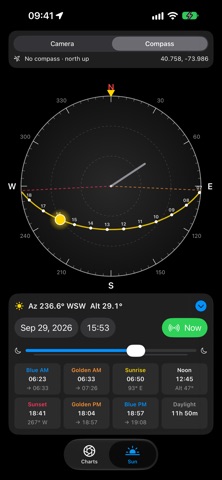



About
Cine Tools puts the charts and sun planning a cinematographer reaches for every day into your pocket.
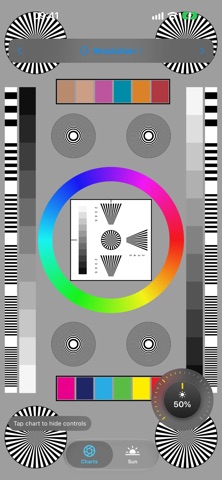
TEST CHARTS Every chart is drawn as sharp vector graphics at your screen's full resolution. • Siemens Star: choose 36 to 180 spokes, a 5-up layout to check corner sharpness, or white on black • Resolution chart: corner stars, frequency bars, converging-line wedges, zone plates, a hue wheel and color patches • 11-step grayscale with a center crossover chip and black reference bars • Color bars + grayscale: 75% bars framing the gray scale for vectorscope alignment • 24-patch color checker with an optional gray ramp
A rotary brightness dial sits next to every chart so you can set screen brightness by feel. Tap the chart to hide the controls and go full screen. Your normal brightness comes back when you leave, and the screen stays awake while a chart is up.
SUN TRACKER • Camera view: see the sun's path for the day over your live camera, with the horizon, compass points and hour marks. If the sun is out of frame, an arrow points toward it. • Compass view: a sky map that turns with your phone, showing the sun's path, sunrise and sunset directions, and which way shadows will fall • Pick any date and time, or scrub through the day with the slider • Blue hour, golden hour, sunrise, sunset, solar noon and total daylight, plus the sunrise and sunset compass directions. Tap any time to jump to it.
PRIVATE BY DESIGN No accounts, no ads, no tracking. Your location, camera and motion data stay on your iPhone.
Note: screen-based charts are great for alignment and relative checks. For absolute color matching, use a calibrated reflective chart.
People rate it
Sign in to rate this app. Honest is what counts.
No ratings yet. Tried it? Be the first to rate it.