
Clicky – Universal TV Remote
Not claimedClicky turns your iPhone or iPad into a convenient remote for compatible smart TVs and…
By Gurwinder Singh · UtilitiesWhy we expect it: A clear, honest universal TV remote with broad platform support and a well-explained setup, serving a large everyday audience.



In short
Clicky, Universal TV Remote turns an iPhone or iPad into a remote for compatible smart TVs and streaming devices on the same Wi-Fi network. It suits people who want one familiar interface for power, volume, inputs, menus, and text entry across several TV brands. One notable detail is that it can dictate a search, show the recognized text for review, and then send it to the TV.
Summary by Debuts, based on the App Store listing.About
Clicky turns your iPhone or iPad into a convenient remote for compatible smart TVs and streaming devices.
Connect your mobile device and TV to the same Wi-Fi network, choose a detected device, and control it from one clean, familiar interface.
KEY FEATURES
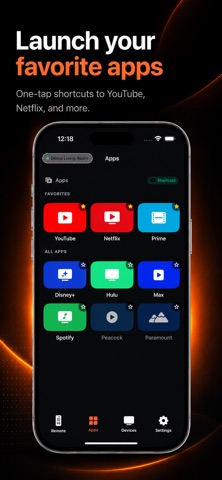
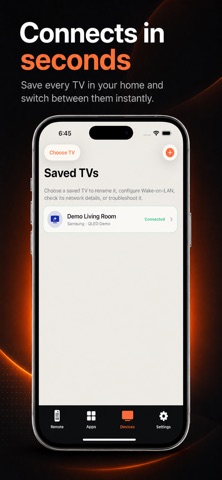
• Automatically find compatible TVs on your local network • Control power, volume, mute, channels, and inputs where supported • Navigate menus using directional controls or the touchpad • Play, pause, rewind, and fast-forward supported media • Type and paste text using your phone on supported TVs • Dictate a search, review the recognized text, and send it to supported TVs • Open compatible installed apps where supported • Save multiple TVs and reconnect using securely stored pairing credentials • Use Siri Shortcuts for supported remote actions
SUPPORTED PLATFORMS
Clicky supports popular television platforms including Samsung, LG webOS, Roku, Sony BRAVIA, Google TV, Amazon Fire TV, Vizio SmartCast, Hisense, and Philips.
Supports Hisense models running Google TV, Roku TV, or Fire TV. Proprietary VIDAA compatibility is limited.
QUICK SETUP
Connect your iPhone or iPad and TV to the same local network. Open Clicky and allow Local Network access. Choose your TV from the available devices. Approve the connection or enter the TV's pairing code if requested. Start controlling your TV. Compatibility and available controls vary by television brand, model, operating system, firmware, geographic region, and network configuration. Some televisions require pairing confirmation or enabling network-control settings. Power-on may require Wake-on-LAN support and compatible TV settings.
Clicky is independently developed and is not affiliated with, sponsored by, or endorsed by any television or streaming-device manufacturer.
Terms of Use: https://zesbe.com/terms Privacy Policy: https://zesbe.com/privacy
People rate it
Sign in to rate this app. Honest is what counts.
No ratings yet. Tried it? Be the first to rate it.
More Utilities apps
Best new Utilities apps this week Drainly: Speaker CleanerMuffled speaker after a splash, rain, or a sweaty workout?
 Photo & PDF Resize: KBFile too large to upload?
 Arvectum Proxy LauncherArvectum Proxy Launcher is a network utility that routes your iPhone through a proxy you…
 Look Twice: Scam & AI CheckLook twice before you click
 Vodoalarm: vodostaji BiHVodoalarm javlja kad tvoja rijeka naglo raste, pa ne moraš stalno gledati vodostaje
 Sift: Photo CleanupYour camera roll is full of blurry shots, old screenshots and videos you'll never watch…