
CodeKeep: Secure Lock Codes
Not claimedEvery lock code you need, right where you need it
By Tallahootie Ltd · UtilitiesWhy we expect it: Clear value, a privacy-focused design, and thoughtful touches like nearby pins and a watch app make this promising.




About
Every lock code you need, right where you need it.
CodeKeep remembers the codes for your doors, padlocks, key safes, gates, cabinets and car parks, and pins each one to where it's used. Walk up to a door and the right code is already at the top of the list.
CodeKeep 2 is a complete redesign for the latest iOS, with a new look, a new map, and CodeKeep on your wrist and in your car.
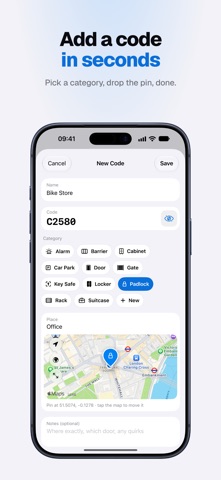
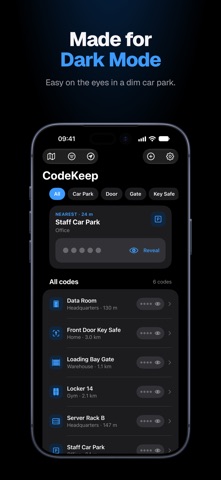
WHAT'S NEW IN CODEKEEP 2 • Fresh Liquid Glass design with full dark mode support • Nearest code card – the closest code sits at the top, ready to reveal • Nearby map – see your codes as pins showing their category, and tap a pin to see how far away it is • Apple Watch app – see and reveal the nearest code from your wrist, with a watch face complication to open it in one tap • Nearest Code widget – for your Home Screen and CarPlay, showing only the categories you choose • Tap to reveal, with a live countdown before the code hides again • Faster adding – choose a category, drop a pin on the map, done
FIND THE RIGHT CODE FAST • Codes sorted by distance, so the nearest is always first • Filter by category or by your current location, or search by name • Open any code in Apple Maps for directions • Satellite view to place pins precisely on large sites
PRIVATE BY DESIGN • Lock CodeKeep with Face ID, Touch ID or your passcode, with your choice of auto-lock time • Codes stay hidden until you tap them, then hide again automatically • Your codes are encrypted in your iPhone's Keychain and covered when CodeKeep is in the app switcher • No accounts, no ads, no tracking. CodeKeep never sends your codes to us
BACKUP AND TRANSFER • Optional encrypted iCloud Backup, protected with your own passphrase (AES-256) • Export to CSV, JSON or plain text, with encryption recommended • Import CodeKeep 2 export files to restore your codes or move them to a new iPhone
ORGANISED YOUR WAY • Unlimited codes, each with a name, place, category, location and notes • Built-in categories for doors, padlocks, key safes, gates, cabinets, lockers, racks, barriers, alarms and more, plus your own • Copy a code or share it with someone who needs it
PERFECT FOR • Homeowners and families • Contractors, facilities and field teams • Holiday let and Airbnb hosts • Gyms, lockers and storage units • Anyone with more codes than they can remember
A note on the widget: when you turn on the Nearest Code widget, the nearest code from the categories you choose can be revealed without unlocking CodeKeep, including in CarPlay while your iPhone is locked. It's off until you turn it on.
Download CodeKeep 2 and never stand at a locked door trying to remember the code again.
Upgrading from CodeKeep 1? Visit https://www.codekeep.app/upgrade
People rate it
Sign in to rate this app. Honest is what counts.
No ratings yet. Tried it? Be the first to rate it.