
Crossleaf
Not claimedCrossleaf is a workspace for the big PDF manuals you work with every day
By MAHMUT SAFA BULAT · ProductivityWhy we expect it: A clear, well-written pitch with a focused purpose should appeal strongly to professionals working with large PDF manuals.




About
Crossleaf is a workspace for the big PDF manuals you work with every day.
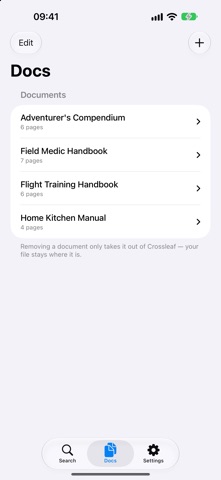
Add your documents once — from Files or iCloud Drive — and search all of them at the same time. Type a phrase like "low air pressure" and Crossleaf shows every place it appears, in every document, organised by document, section and page. Tap a result and the page opens right at the match, highlighted. Go back and your results are still there.
SEARCH EVERYTHING AT ONCE • One search across all your documents • Results grouped as Document › Section › Page, from each PDF's own outline • Search history for the phrases you look up again and again
MADE FOR iPAD, GREAT ON iPHONE • Three columns on iPad: documents, results and the page side by side • Full-screen reading with a single tap • A quick, one-handed search on iPhone
YOUR FILES STAY WHERE THEY ARE • Documents in iCloud Drive or Files are read in place — nothing is copied • Give any document a short name to show in results • Crossleaf tells you if a PDF has no text layer or no outline
MARK UP WITH APPLE PENCIL • Draw and highlight right on the page • Your markup is saved into the PDF itself, so it shows up wherever you open it
BOOKMARKS AND REVISION REMINDERS • Bookmark any page, grouped by document • An optional weekly reminder to check for new revisions
PRIVATE BY DESIGN Crossleaf never connects to the internet and collects no data. No account, no tracking, no ads. Your documents never leave your device.
One purchase. No subscription.
People rate it
Sign in to rate this app. Honest is what counts.
No ratings yet. Tried it? Be the first to rate it.