
Cuefaro: Show Cues
Not claimedCuefaro runs the sound of a small show from one GO button
By Oomny B.V. · Music and audioWhy we expect it: A thoughtfully described show-cue tool with clear safety rules, a clear one-GO workflow and a focused audience, making it a strong debut.



In short
Cuefaro: Show Cues is a music-audio app that runs the sound of a small live show, such as a magic act, dance class, school musical or talk, from a single GO button. Users arrange audio cues in order, freeze a rehearsed version, and send it as one package to another device. Its standout feature is that only GO produces sound, so a tap on a cue never starts playback by accident.
Summary by Debuts, based on the App Store listing.About
Cuefaro runs the sound of a small show from one GO button. Put your audio in order, freeze the version you rehearsed, and on the night press GO for each cue. For magic acts, dance classes, school musicals, cabaret, theatre and talks.
ONE GO, ONE CUE Tapping a cue in the running order only puts it on standby; only GO makes sound. GO names the cue it will start, and the standby line shows the note you wrote for that moment, such as "GO as the curtain opens". A double tap starts one cue, never two.
MORE THAN ONE SOUND AT A TIME Play a cue on top of what is already sounding, or fade the running cues out with a crossfade you set. Hits have their own buttons for applause, a bell or a laugh, play on top and never move the standby cue. Up to eight sounds play at once, and each has its own stop.
AUTOMATIC FOLLOWS AND WAITS Let the next cue follow when this one ends or a few seconds after it starts, and add silent waits to pace a sequence. A countdown shows what follows. A STOP, a pause, a failure or putting another cue on standby cancels it; nothing ever starts on its own after a problem.
IN CONTROL DURING THE SHOW Pause and resume freeze everything, fade all out takes the whole show down in three seconds, DIM lowers the output while someone speaks, and a show timer runs from the first GO. A pedal or keyboard works too: space, enter or an arrow for GO, escape for STOP, 1 to 9 for the hits.
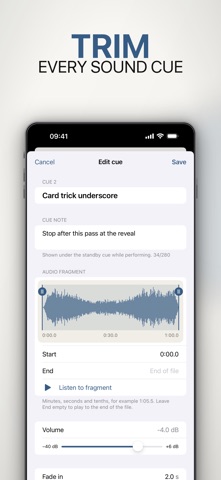
EVERY CUE THE WAY YOU NEED IT Trim the fragment on the file's real waveform, set volume, fades, repeats (until STOP or a set number of times), tempo without changing the pitch, and left-right pan.
A CHECK BEFORE YOU PLAY Before a show Cuefaro names the frozen version and any audio that is missing or changed, and a test tone lets you check the output. Restore a missing file at the cue itself.
FREEZE AND HAND OVER Freeze a numbered version with a checksum for every file, then send it as one show package. It opens complete on another phone or tablet with Cuefaro, so a technician or a replacement plays exactly what you rehearsed.
YOURS, ON YOUR DEVICE WAV, M4A and MP3 are copied into the app and keep working offline after the original is gone. No account, no cloud, no analytics, no ads. Recently deleted shows can be put back.
FREE FIRST SHOW, ONE-TIME UNLOCK Your first show is free with every feature, and the two example shows do not count. A one-time purchase unlocks more shows. No subscription.
People rate it
Sign in to rate this app. Honest is what counts.
No ratings yet. Tried it? Be the first to rate it.
More Music and audio apps
Best new Music and audio apps this week KlingKlang – Control de AudioKlingKlang reúne todas las salas de tu sistema Sonos en una sola pantalla
 BANANA-1One banana
 Acord: Guitar Tuner, MetronomeAcord is a precise tuner and metronome for every musician
 MonandaegMōnandæg is two field recorders that cannot leave anything alone
 Yul — Gugak Tuner & JangdanA tuner and rhythm trainer built for Korean traditional instruments
 MusiquitosMusiquitos es una app de música para niños con treinta canciones para cantar, bailar y…