
Culla — Fast Photo Culling
Not claimedCulla is a fast, keyboard-driven way to cull a shoot on your Mac
By Alexander Grebenschikov · Photo and video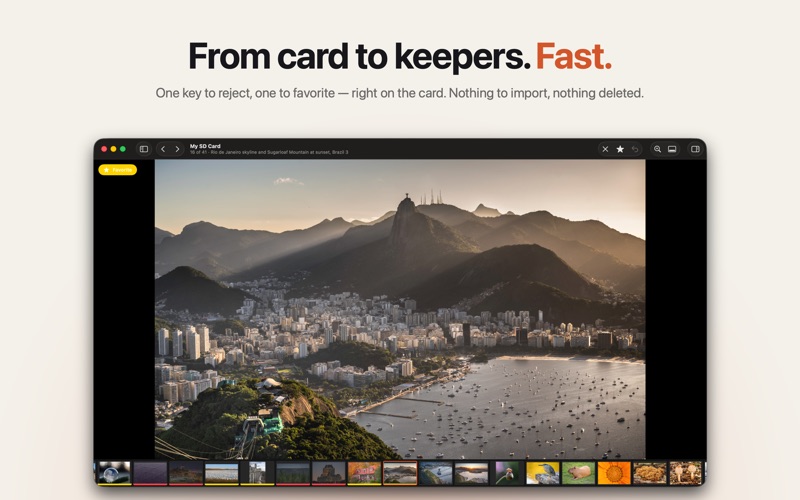


About
Culla is a fast, keyboard-driven way to cull a shoot on your Mac. Open a memory card, an external disk or any folder and start right away: there's nothing to import and no catalog to build.
Look at each photo once and decide: keep it, reject it or mark it as a favorite. One key per decision, and the next photo is already on screen.
RIGHT ON THE CARD • Works directly on memory cards, external disks and folders. • Photos appear while Culla is still scanning, so you can start immediately. • Your decisions live on the card itself: rejected photos move into a _Culla_Rejected folder and favorites into _Culla_Favorites, with the original folder structure kept inside. • Culla never deletes anything. When you're sure, delete the rejects yourself in the Finder.
BUILT FOR RAW SHOOTERS • RAF, CR3, CR2, NEF, ARW, ORF, RW2 and DNG, plus JPEG and HEIC/HEIF. • A RAW file, its JPEG or HEIC twin and the .xmp sidecar are one photo and always move together. • Photos are shown in the order they were taken, even across several folders or cameras. • Zoom in to check focus: Culla loads the full-resolution image while you look. • The inspector shows camera, lens, exposure, size and every file the photo is made of.
FAST AND SAFE • Customizable keyboard shortcuts that work with any input language. • Holding a key doesn't repeat Reject or Favorite, so you can't mark a whole burst by accident. • Unlimited undo and redo for every decision. • If a card is pulled out mid-move, Culla finds the affected photos next time and puts them back. • Read-only cards are detected, so nothing is changed by mistake.
PROJECTS • Every card or folder you open becomes a project in Recent Projects, each in its own window. • Culla remembers where you left off: the photo, the collection and your layout.
No account, no tracking. Your photos never leave your Mac.
People rate it
Sign in to rate this app. Honest is what counts.
No ratings yet. Tried it? Be the first to rate it.