
Cut To Fade
Not claimedCut to Fade is a screenwriting app built by a filmmaker, for the whole journey from…
By Tachena Nhubu · ProductivityWhy we expect it: A thorough, filmmaker-built screenwriting app with industry-standard formatting and a clear, well-described feature set.

About
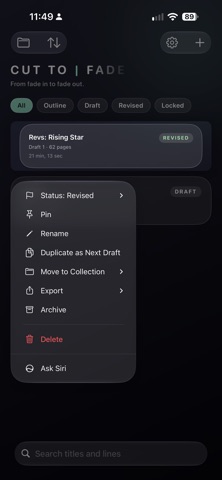
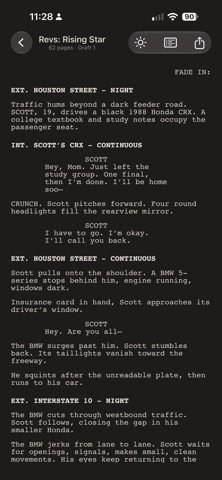
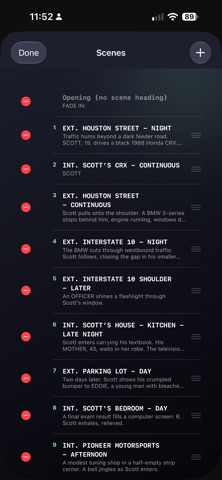
Cut to Fade is a screenwriting app built by a filmmaker, for the whole journey from first idea to the last shot of the day. Write a properly formatted script, shape it on a Story Board, then take it to set with a shot list that stays linked to your pages.
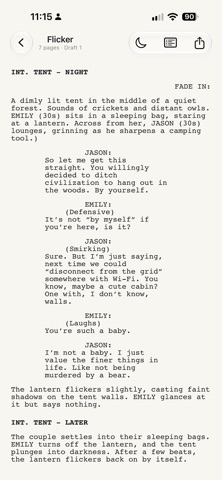
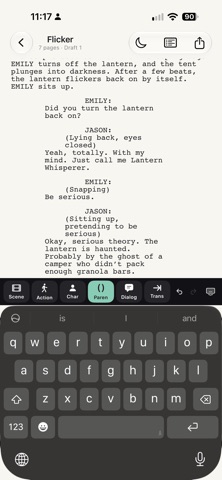
WRITE WITHOUT THINKING ABOUT FORMAT - One continuous page with a six-button format bar above the keyboard: Scene, Action, Character, Parenthetical, Dialogue, Transition - Type INT. or EXT. and it becomes a scene heading; Tab and Return move between elements the way screenwriters expect - Smart paste recognises headings, character cues and dialogue - Dual dialogue, bold, italic and underline - Dictation: say "Interior kitchen night… Sarah says where were you" and get a heading and a speech - Paper or Night page, adjustable text size, Find & Replace
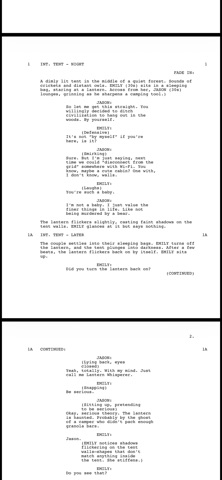
INDUSTRY-STANDARD PAGES - 12pt Courier PDF with correct margins and proper page breaks - US Letter or A4, Screenplay or Multi-Camera (sitcom) format - Act breaks for TV: COLD OPEN, ACT ONE, END OF ACT ONE, TAG - Title page, scene numbers and CONTINUEDs for shooting scripts - Lock a script and numbering works like a production: new scenes become 12A, cut ones stay OMITTED - Revisions in the standard colour order with asterisks in the margin, and locked pages that flow onto A-pages
SEE YOUR STORY ON A STORY BOARD - Every scene becomes a card on an infinite canvas, arranged by story beats - Drag a card and the script reorders to match - Frameworks include Three-Act, 15-Beat, Story Circle, Hero's Journey, Eight Sequences, TV Hour and TV Half-Hour, or build your own - Character lanes, reference photos, story links (sets up, causes, mirrors) and a page timeline that shows if your beats are landing on target - Export a beat sheet PDF
A SHOT LIST BUILT INTO THE SCRIPT - Add shots to each scene: size, angle, movement, lens, camera, cast, sound, VFX and stunt flags, setup time and a frame image - Shots are numbered from their scene (12-1, 12A-3) and stay linked through rewrites - Plan shooting days with call and wrap times - On Set mode: check off shots, see your projected wrap, and push unfinished shots to another day - Export PDF (with frames) or CSV, or Send to Crew so your team can check off shots on their own device - Final Draft shot elements import as shots automatically
REWRITE, COMPARE AND COLLABORATE - Compare Drafts and named Snapshots you can restore at any time - Comments with replies, and Send to Co-Writer: when their copy comes back it lands as the next draft with both sets of comments merged - Reading Mode with Apple Pencil notes and an annotated PDF - Table Read: hear your script aloud with a different voice for each character - Statistics, a breakdown report, scene tags and colours, Rename Character or Location everywhere at once - Daily writing goals with streaks
WORKS WITH YOUR FILES - Import and export Final Draft (.fdx) and Fountain, plus plain text - Print or share an industry-standard PDF
EVERYWHERE YOU WRITE - iPhone, iPad and Mac, synced through your private iCloud - Full keyboard shortcuts and menus on Mac and iPad - Siri and Shortcuts: new script, add a scene, capture an idea, page count - No account, no ads, no tracking
FREE TO START, ONE-TIME PRO UNLOCK Write up to two scripts free, with every writing tool, the Three-Act Story Board and three shots per script to try the Shot List. Cut to Fade Pro is a single purchase, not a subscription. It unlocks unlimited scripts, every Story Board framework with lanes, photos, timeline and beat sheet export, and the full Shot List. One purchase covers iPhone, iPad and Mac.
People rate it
Sign in to rate this app. Honest is what counts.
No ratings yet. Tried it? Be the first to rate it.