
Daybook: Keep the Day
Not claimedDaybook puts the day on one page: the tasks due, the events on your calendar, and the…
By JARRETT WALTON MERCER · Productivity


In short
Daybook: Keep the Day lays out tasks, calendar events and tracked time on one page, from morning to night. It suits people who want their tasks, schedule and timesheet in a single daily view across iPhone, iPad and the website. One standout is the Today screen, which shows overdue tasks first and fills a ring as you tick things off.
Summary by Debuts, based on the App Store listing.About
Daybook puts the day on one page: the tasks due, the events on your calendar, and the time you spend, laid out from morning to night.
TODAY See the day as a path from morning to evening, with overdue tasks at the top and anything without a time set apart. Tick things off as you go and watch the ring fill.
PLAN AHEAD Next 7 Days shows the week at a glance. The Calendar puts your events beside your tasks, and you can drag a task onto another day to move it. Give any task a time, a repeat and reminders.
LISTS AND INBOX Write a task in the moment and sort it later. Keep lists for home, work and anything else, add steps to a task, and share a list with someone.
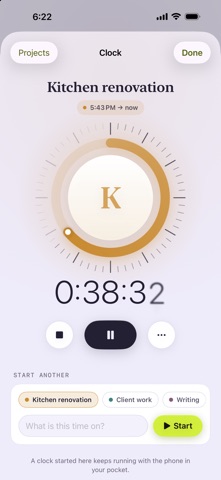
KEEP THE TIME Start a clock on a project from anywhere and see it on your Lock Screen. The timesheet lays your weeks out by day, and you can log or fix entries by hand. The focus timer runs a block of work against a task.
MORE IN THE SAME HAND Habits, countdowns, stats, and an asset register for the things you own, with photos and receipts.
WORKS EVERYWHERE YOU ARE Daybook keeps a copy on your iPhone and iPad so it opens offline, and syncs with the website at usedaybook.app. Sign in with Face ID or Touch ID through a passkey. Widgets and reminders keep the day in view.
DAYBOOK PRO Daybook on iPhone and iPad is part of Daybook Pro: • Pro Monthly — $5 a month • Pro Yearly — $30 a year • Pro Lifetime — $99, paid once
Payment is charged to your Apple Account at confirmation of purchase. Subscriptions renew automatically unless cancelled at least 24 hours before the end of the current period, and your account is charged for renewal within 24 hours before the end of the period. Manage or cancel subscriptions in your Apple Account settings after purchase.
Privacy Policy: https://usedaybook.app/privacy Terms of Use: https://www.apple.com/legal/internet-services/itunes/dev/stdeula/
People rate it
Sign in to rate this app. Honest is what counts.
No ratings yet. Tried it? Be the first to rate it.
More Productivity apps
Best new Productivity apps this week ChickMark: Habit TrackerChickMark is a simple habit tracker for routines, goals, and reminders
 Dayflint: One Thing a DayToo many priorities?
 Fristo CAFMFristo is the app for Fristo CAFM, the facility management software
- BeginAnywayMorning alarm for hard tasks: set one task, prove you started, build a streak
 DHUDEDHUDE Analityxs es la herramienta de gestión diaria para grupos de restauración y ocio…
 FTC BIOBUZZ Scorer & TrainerBIOBUZZ Scorer is a free, ad-free scorer for the 2026–2027 FTC season, built on…