
DCLiner
Not claimedDCLiner lives in your menu bar and scrobbles the songs you play in the Music app to your…
By Diego Castilho · Music and audio



About
DCLiner lives in your menu bar and scrobbles the songs you play in the Music app to your Last.fm profile, automatically and following Last.fm's official rules.
SCROBBLING THAT JUST WORKS • Detects what's playing in Music. Just connect your Last.fm account. • Sends a scrobble once you've listened to half of a track (or four minutes), and updates "Now Playing" on your profile. • Want to be stricter? Raise the threshold up to 90% of the track. • Offline? Scrobbles wait in a queue and are sent when the connection comes back. Nothing is lost.
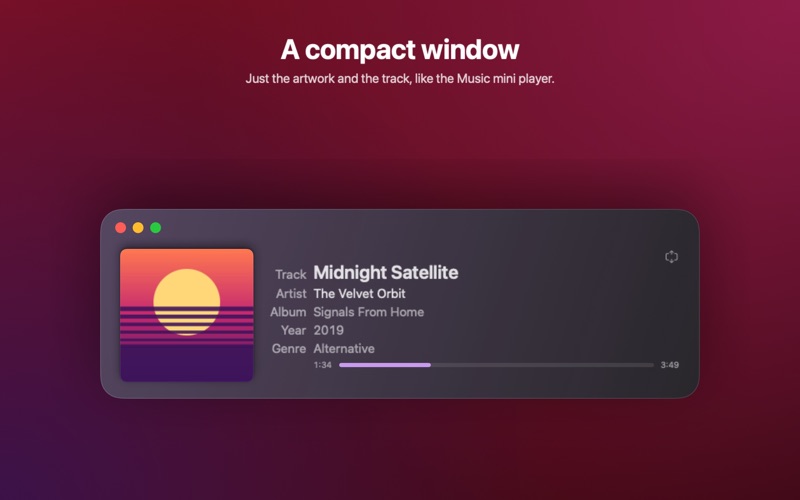
A NATIVE MAC APP • A menu bar panel in three sizes, with the album artwork, the track, and its progress. • Show the song, the artist, and the album right in the menu bar, or just the icon. • A window with your scrobble log: search, filter by status, and see what was sent. • Compact mode: just the artwork and the track, like the Music mini player. • Desktop widgets in five sizes, with the artwork and your recent scrobbles. • Colors that follow the artwork of the album you're playing. • Launches at login, with or without a Dock icon.
YOUR HISTORY, ON YOUR MAC • Import your Last.fm history into a local database. • Choose how long the log is kept, and clear it whenever you want.
PRIVATE BY DESIGN • No ads, no analytics, no tracking. • The app only talks to Last.fm (to send your scrobbles) and to the Apple Music catalog (for artwork, year, and genre). • It reads the track playing in Music, and nothing else from your library.
Available in English and Brazilian Portuguese. The Extra Large Portrait widget requires macOS 27.
DCLiner requires a free Last.fm account and the Music app. Last.fm is a trademark of Last.fm Ltd. DCLiner is not affiliated with Last.fm.
People rate it
Sign in to rate this app. Honest is what counts.
No ratings yet. Tried it? Be the first to rate it.