
Device Monitor: Specs & Tests
Not claimedSee what your device is doing right now — CPU, memory, storage, network and battery…
By Dzianis Milasheuski · Utilities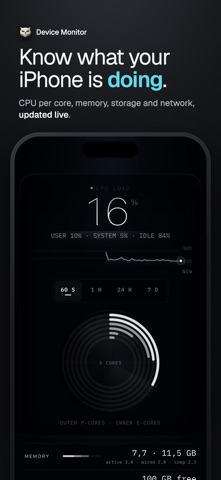


In short
Device Monitor: Specs & Tests is a utilities app that shows live CPU, memory, storage, network, battery and thermal readings, plus a full spec sheet for the device. It also runs hardware checks on the screen, touch, speakers, microphone, sensors and haptics, with a shareable report. Nothing leaves the device, and it shows only what the system exposes to apps.
Summary by Debuts, based on the App Store listing.About
See what your device is doing right now — CPU, memory, storage, network and battery, live — and check the screen, touch, speakers, microphone and sensors with a report you can share. Every number comes straight from the system.
LIVE, RIGHT NOW • CPU load for every core, with performance and efficiency cores shown separately • Memory in use, broken down so you can see what is really taking space • Storage used and free • Network speed up and down • Battery level and charging state • Thermal state, from normal to critical • Uptime since the last restart
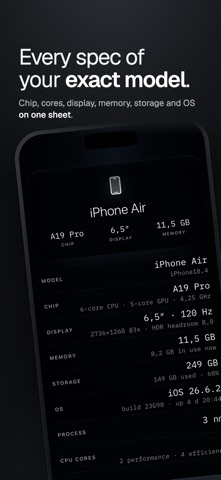
YOUR EXACT MODEL The full spec sheet for the device in your hand: chip, core layout, memory, storage, display size and refresh rate, operating system and build. Details the system does not report, like the screen diagonal or the chip's peak frequency, come from a built-in model database.
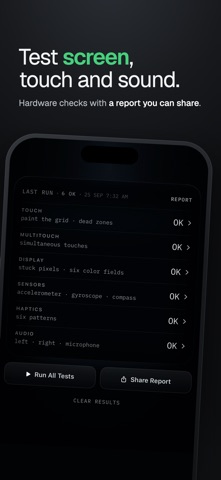
HARDWARE TESTS • Screen: fill the display with solid colors to spot stuck pixels • Touch: paint the whole screen to find dead zones, with multitouch • Audio: play a tone through each speaker, record yourself with the microphone and play it back • Sensors: watch motion and orientation follow your hand • Haptics: feel every vibration pattern • On Mac: keyboard and trackpad tests You give the verdict after each test, because only you can see and hear the result. Nothing leaves the device. Handy before buying or selling a used device.
WIDGETS AND GLANCES • Home Screen widgets for CPU, memory, storage, network, thermal state, uptime and battery, plus a four-metric dashboard • Lock Screen widgets • Control Center control • Live Activity with Dynamic Island while the app is open
ON THE MAC The native Mac version puts up to three live stats in the menu bar, with desktop widgets.
PRO • The complete spec sheet for your exact model • Every widget and metric • A test report you can share after your hardware tests • 24-hour and 7-day history, battery timeline and thermal log • Alerts when battery, storage, memory or thermal state cross your threshold. History and alerts keep working while the app is closed as long as a Device Monitor widget is on your Home Screen. • Instrument colors: green, cyan, amber, white Pro is available monthly, yearly or as a one-time purchase, and one purchase covers iPhone, iPad and Mac.
WHAT IT SHOWS Device Monitor shows only what the system makes available to apps. Readings the system keeps to itself are never made up — the About screen lists them.
PRIVATE BY DESIGN • Everything runs on your device. Nothing is uploaded. • No account. No ads. No tracking.
Terms of Use: https://raw.githubusercontent.com/porconova/legal/refs/heads/main/DM-Terms-of-Service Privacy Policy: https://raw.githubusercontent.com/porconova/legal/refs/heads/main/DM-Privacy-Policy
People rate it
Sign in to rate this app. Honest is what counts.
No ratings yet. Tried it? Be the first to rate it.
More Utilities apps
Best new Utilities apps this week Drainly: Speaker CleanerMuffled speaker after a splash, rain, or a sweaty workout?
 Photo & PDF Resize: KBFile too large to upload?
 Arvectum Proxy LauncherArvectum Proxy Launcher is a network utility that routes your iPhone through a proxy you…
 Vodoalarm: vodostaji BiHVodoalarm javlja kad tvoja rijeka naglo raste, pa ne moraš stalno gledati vodostaje
 FairAuth: AuthenticatorFairAuth creates the codes for two-step verification on iPhone and iPad
 Polarglow: Aurora AlertsKnow tonight's chance of seeing the aurora where you are, and never miss a storm night