
Dictaphone: Voice Notes & Text
Not claimedDictaphone is a voice recorder that writes everything down for you
By Grzegorz Kowalewski · UtilitiesWhy we expect it: A strong utility concept with on-device transcription, clear value and thoughtful features, though it has no ratings yet and the audience is niche.



In short
Dictaphone: Voice Notes & Text records audio and turns each recording into text that can be read, searched, edited and shared. Transcription runs on the device in more than 100 languages, and the app is aimed at anyone who wants written notes from spoken audio. It stands out for offering summaries, to-do checklists and speaker labels for every recording, with no account or ads.
Summary by Debuts, based on the App Store listing.About
Dictaphone is a voice recorder that writes everything down for you. Tap once to record, and every recording turns into text you can read, search and share. The transcription runs right on your iPhone, and your recordings never leave your devices.
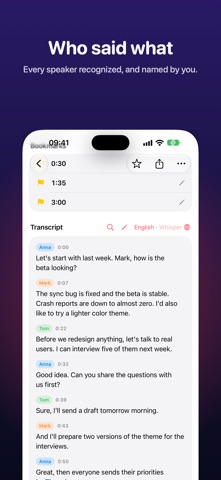
EVERY WORD, IN YOUR LANGUAGE • Transcription on your device in more than 100 languages, powered by Whisper and Apple speech recognition • See your words appear live while you record, in languages supported by Apple speech recognition • Each word lights up as you listen; tap any word to jump there • Correct any word right in the transcript • Search all your recordings by what was said, and jump between highlighted matches in a transcript • Translate transcripts into other languages, on your device • See who said what: identify the speakers and give each one a name • Long recordings keep transcribing in the background
SUMMARIES AND TO-DOS • A title, a short summary, key points and a checklist of tasks for every recording, made by Apple Intelligence on supported devices and languages
RECORDING THAT FEELS ALIVE • A live waveform that breathes with your voice • Bookmarks while you record, so you can find the important moment later • Optional noise reduction • Choose the microphone (built-in, headphones or USB) and record in stereo • Keeps recording when you lock the screen, with a Live Activity on the Lock Screen and in the Dynamic Island
PLAYBACK AND EDITING • Play at 0.5× to 3× without changing the pitch • Skip silence • Trim the ends or cut out a part in the middle, and record more onto an existing recording • Enhance Recording reduces background noise afterwards, and the original is always one tap away
STAY ORGANIZED • Folders, favorites and tags • Sort by date, length or name • Select several recordings to move or delete them at once • Recently Deleted keeps deleted recordings for 30 days
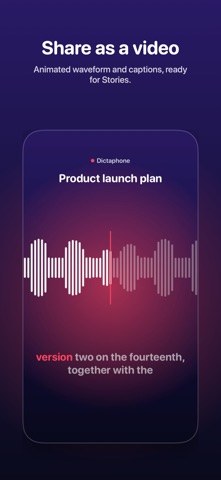
SHARE ANYTHING • Animated video clips with captions, ready for Stories and Reels • Export audio, PDF, plain text, Markdown or SRT subtitles
EVERYWHERE YOU ARE • Start recording from a widget, Control Center, the Action Button or Siri • Apple Watch app: record from your wrist, and recordings come to your iPhone • iPad with a side-by-side library • Import audio and video files from Files or other apps • Shortcuts actions: get a recording's transcript or summary, search recordings, import files
PRIVATE BY DESIGN • No account, no ads, no tracking • Lock the app, or single recordings, with Face ID • Sync between your devices through your own iCloud
One purchase. No subscription.
People rate it
Sign in to rate this app. Honest is what counts.
No ratings yet. Tried it? Be the first to rate it.
More Utilities apps
Best new Utilities apps this week Drainly: Speaker CleanerMuffled speaker after a splash, rain, or a sweaty workout?
 Photo & PDF Resize: KBFile too large to upload?
 Arvectum Proxy LauncherArvectum Proxy Launcher is a network utility that routes your iPhone through a proxy you…
 Vodoalarm: vodostaji BiHVodoalarm javlja kad tvoja rijeka naglo raste, pa ne moraš stalno gledati vodostaje
 Dusty: Photo Cleaner PetYour camera roll's new pet
 FairAuth: AuthenticatorFairAuth creates the codes for two-step verification on iPhone and iPad