
Distract: Feed Blocker
Not claimedDistract turns the page you're on into a simple map of blocks
By Mega Creations LLC · ProductivityWhy we expect it: A clever, privacy-respecting Safari extension with a clear wireframe concept and thorough per-site controls, aimed at a real audience of people seeking less feed clutter.




About
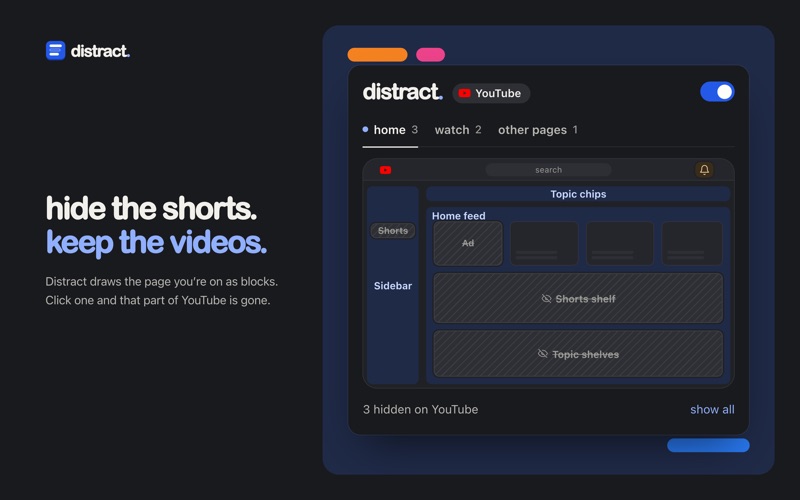
Distract turns the page you're on into a simple map of blocks. Click a block and that part of the site disappears. Click it again and it comes back.
Works on YouTube, X, Facebook and Instagram: • YouTube: Shorts, the home feed, topic chips and shelves, Up next, comments, end cards, live chat, ads and the notification bell • X: Trending, Today's news, Who to follow, promoted posts, Premium upsells, Grok, the composer and the timeline • Facebook: Reels, Stories, suggested posts, the sponsored panel, friend requests, contacts, Marketplace and the shortcuts sidebar • Instagram: Reels, Stories, sponsored and suggested posts, the right rail, notifications and the Messages pill
How it works • Click the Distract button in Safari's toolbar. The popup draws the current page as a wireframe laid out like the real site. • Hover a block to see that section outlined on the page. Hover a hidden one to peek at it. • Colours tell you what a block is: blue for page areas, pink for feed clutter, amber for buttons. • Pause Distract on any site with one switch, or bring everything back with "show all". • Hiding Shorts opens Shorts links in the normal player. Hiding Up next centres the video.
Getting started Open Distract once, then turn it on in Safari Settings → Extensions and allow it on the four sites.
Private by design Distract has no account, no analytics and makes no network requests. Your choices stay in Safari.
Distract is not affiliated with or endorsed by Google, YouTube, X Corp., or Meta. Product names are used only to show which site a setting applies to.
People rate it
Sign in to rate this app. Honest is what counts.
No ratings yet. Tried it? Be the first to rate it.