
Docenity: PDF Scanner & Sign
Not claimedScan paper, edit PDFs and keep your documents organized with Docenity
By Ahlam Saleh · ProductivityWhy we expect it: Clear one-time paid value, no subscriptions, and a thorough feature set make this a promising productivity pick.





About
Scan paper, edit PDFs and keep your documents organized with Docenity.
One paid download includes all supported tools, with on-device processing and no account, subscription or in-app purchases.
SCAN AND RECOGNIZE TEXT Scan documents, receipts, ID cards, book pages and whiteboards. Capture multiple pages, adjust their edges and save a PDF. Combine selected photos into a document. Recognize text on your device and create searchable PDFs.
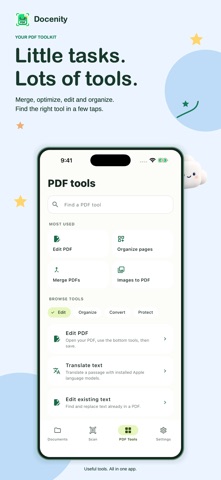
EDIT AND SIGN ON THE PAGE Open a PDF in one editor. Add text, highlights, handwritten signatures, custom watermarks, links, headers and page numbers. Place text, signatures and other additions directly on the page, then move or resize them. Watermarks repeat across the page. Fill supported PDF forms or add an interactive text field. Save an edited copy while keeping your original.
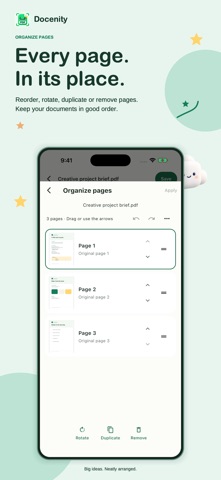
ORGANIZE YOUR DOCUMENTS Merge PDFs and split or extract pages. Reorder, rotate, duplicate or remove pages with thumbnails. Crop pages, fit them to A4 or US Letter, and prepare booklets or multiple pages per sheet. Find files with search, folders, tags and favorites. Move documents to Trash, restore them or permanently delete Docenity’s local copies.
CONVERT AND EXPORT Turn photos into PDFs and export PDF pages as PNG or JPEG. Extract selectable text and supported embedded images. Convert text from DOCX, XLSX and PPTX files to PDF, or export PDF text to Word, Excel, PowerPoint, text and Markdown.
Office conversions are text-based. Original layouts, charts, embedded images and complex tables are not reconstructed.
MORE PDF TOOLS Optimize supported PDFs while keeping text and page objects. Already optimized files may not become smaller. Compare document text or page appearance, flatten annotations and create flattened copies for archiving. Optional App lock in Settings protects access to Docenity using your device’s authentication.
Some tools rebuild pages as images, flattening selectable text, links or interactive fields. A drawn signature is a visible mark, not an identity-verification or remote-signing service.
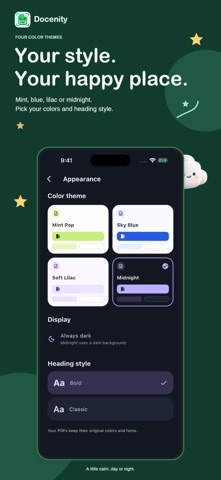
MAKE IT YOURS Choose Mint Pop, Sky Blue, Soft Lilac or Midnight, with Bold or Classic headings. Mint Pop, Sky Blue and Soft Lilac support light, dark or system appearance. Midnight uses a dark interface. Changing the app’s theme or heading style does not change your documents’ colors or fonts.
PRIVATE, WITH HELP BUILT IN Documents are processed on your device, without a Docenity upload server, advertising or third-party analytics. No automatic Docenity watermark is added. An offline Help Center explains the tools, saving, signatures, Trash and common problems.
Files you share go to your chosen destination. Cloud file providers, Apple model downloads and device backups follow your system settings and those services’ policies.
People rate it
Sign in to rate this app. Honest is what counts.
No ratings yet. Tried it? Be the first to rate it.