
DocQuery: Private PDF Q&A
Not claimedAsk a question about a contract, a filing, or a policy — and get an answer with the page…
By Tigran Mkrtchyan · Productivity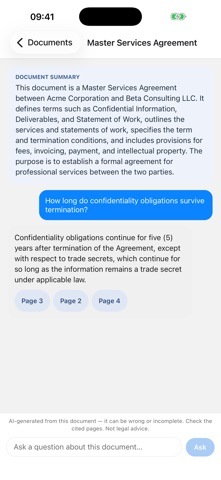



In short
DocQuery: Private PDF Q&A answers questions about your PDFs entirely on iPhone, with no server receiving your files. It is aimed at people who cannot paste confidential documents such as NDA agreements, filings, or patient records into a web chatbot. Each answer links to the exact page it came from, so the clause can be checked directly.
Summary by Debuts, based on the App Store listing.About
Ask a question about a contract, a filing, or a policy — and get an answer with the page it came from.
DocQuery reads your PDFs and answers questions about them entirely on your iPhone. No server sees your files. No account, no sign-in, no analytics.
EVERY ANSWER CITES ITS SOURCE Each answer carries the pages it was drawn from. Tap a citation and the PDF opens at that exact page, so you can read the clause yourself. Passages never span a page break, so a citation always resolves to one specific page — not a vague "somewhere in this document."
GENUINELY ON-DEVICE Text extraction, search, and answer generation all run locally. Turn on Airplane Mode and ask a question — the answer still comes. The only time DocQuery uses the network is the one-time model download and, if you subscribe, verifying your receipt with Apple. Your documents, your questions, and the answers are never uploaded.
FOR DOCUMENTS YOU CAN'T PASTE INTO A CHATBOT Agreements under NDA. Filings under seal. Personnel files, patient records, board papers — anything your obligations don't let you hand to a web service.
WHAT YOU GET • Ask anything about a loaded PDF, in plain language • A short summary of each document when you add it • Page citations on every answer, tappable straight to the source • A built-in PDF reader • Fully offline once set up
BEFORE YOU DOWNLOAD • First launch downloads a 1.12 GB language model. After that, no network is needed. • Works with text-based PDFs. Scanned or image-only files are not supported — there is no OCR, and DocQuery says so plainly rather than returning a bad answer. • iPhone only. • Answers come from a small on-device model and can be wrong. The citations exist so you can verify them. Treat it as a research aid, not legal advice.
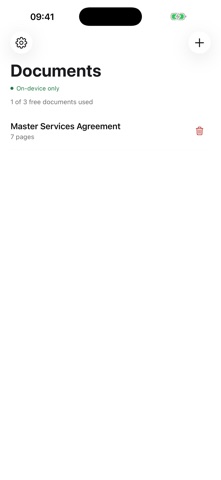
FREE • Up to 3 documents at a time • 20 questions a day • Full answer, summary and citation quality — nothing held back
DOCQUERY PREMIUM • Unlimited documents • Unlimited questions • $3.99 per month, or $24.99 per year
Payment is charged to your Apple Account at confirmation of purchase. Your subscription renews automatically for the same period and price unless you cancel at least 24 hours before the current period ends. Manage or cancel anytime in Settings › Apple Account › Subscriptions.
Terms of Use (EULA): https://www.apple.com/legal/internet-services/itunes/dev/stdeula/ Additional Terms: https://tigranmk.github.io/docquery-site/terms/ Privacy Policy: https://tigranmk.github.io/docquery-site/privacy/
People rate it
Sign in to rate this app. Honest is what counts.
No ratings yet. Tried it? Be the first to rate it.
More Productivity apps
Best new Productivity apps this week ChickMark: Habit TrackerChickMark is a simple habit tracker for routines, goals, and reminders
 Dayflint: One Thing a DayToo many priorities?
 Fristo CAFMFristo is the app for Fristo CAFM, the facility management software
- BeginAnywayMorning alarm for hard tasks: set one task, prove you started, build a streak
 DHUDEDHUDE Analityxs es la herramienta de gestión diaria para grupos de restauración y ocio…
 Fillerless: Teleprompter CoachFillerless is a teleprompter that follows your voice and then tells you how you spoke