
DOT Compliance: Fleet Files
Not claimedFleet Files keeps your DOT compliance paperwork in one place: driver files, truck…
By Emmanuel Badu · Productivity



In short
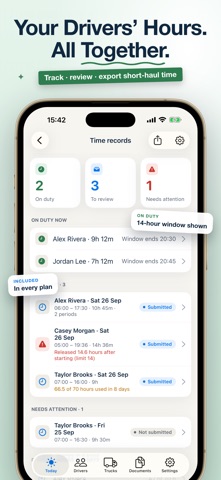
Fleet Files, from DOT Compliance, is a productivity app that keeps DOT paperwork together: driver qualification files, truck inspections and maintenance, and short-haul time records. It is built for owner-operators and small fleets, and it notes the FMCSA rule behind each item. One distinctive feature is that drivers can record short-haul duty times offline, and split shifts add up automatically.
Summary by Debuts, based on the App Store listing.About
Fleet Files keeps your DOT compliance paperwork in one place: driver files, truck records, inspections, short-haul time records and the dates that come due. Built for owner-operators and small fleets.
SEE WHAT NEEDS ATTENTION • One home screen shows what's overdue, what's due soon and which records are missing • Every item names the FMCSA rule it comes from • Reminders before licenses, medical cards, registrations and inspections expire, as far ahead as you choose
DRIVER QUALIFICATION FILES • Keep each driver's license, medical card, MVRs, road test and other qualification documents together • Scan paper documents with your camera; dates are read from the page for you to confirm • Drug and alcohol records, including Clearinghouse queries, are visible only to the owner and admins • Hazmat drivers: track each driver's hazmat endorsement expiration
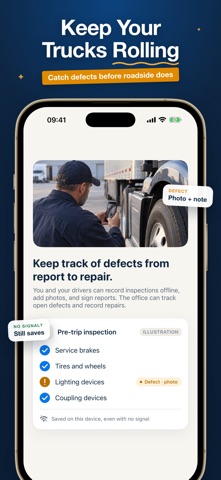
TRUCK INSPECTIONS AND MAINTENANCE • Pre-trip and post-trip inspections (DVIR) with a checklist, defect photos, notes and signature • Before a pre-trip, drivers see the truck's last inspection and any open defects • Mark defects repaired, with who fixed them and when • Track annual inspections, registration and scheduled maintenance for every truck
SHORT-HAUL TIME RECORDS • For local drivers who use the 150 air-mile short-haul exception (49 CFR 395.1(e)) instead of logs • Drivers tap Start duty and End duty in the app or a web browser; split shifts add up automatically, even without signal • Warnings at 13 hours, for short rest, near the 60/70-hour limit and for days that need a log • Drivers submit each day; the owner or an admin reviews it, corrects it or sends it back, and every change keeps its history • Export PDF or CSV time records for any date range
YOUR TEAM AND DRIVERS • Invite admins and drivers by email; each person connects with their own private code • Browser access included, so your team doesn't need to download the app • Drivers get a simple app for the trucks assigned to them: time records, inspections, their own file and their reports • Drivers can upload documents; they count once the owner or an admin approves them • Notifications when a driver reports a defect or uploads a document • An activity log shows who changed what and when
HAZMAT RECORDS (OPTIONAL ADD-ON) • A hazmat haul register: driver, truck, date and shipping papers for each haul • Drivers submit shipping papers in the app or a web browser; the office reviews them • 3-year hazmat training reminders, including for non-driver employees • PHMSA registration and, where it applies, the Hazardous Materials Safety Permit • Missing-record alerts and a per-haul export
READY WHEN RECORDS ARE REQUESTED • Create a PDF records packet with driver, truck and company records and a list of missing items • Records sync securely across iPhone, iPad and web browsers
PLANS Fleet Files requires a monthly subscription after setup. Drivers and admins you invite are covered by your subscription. • Starter: up to 7 trucks, 11 driver logins, owner + 1 admin, 10 GB of document storage • Fleet: up to 30 trucks, 40 driver logins, owner + 4 admins, 50 GB of document storage Need more room? Optional monthly add-ons, available while your subscription is active: Extra storage (+5 GB to +50 GB) and Fleet Expansion (+2 trucks and +3 drivers per step). Hazmat Records: optional add-on for either plan, one price per fleet, covering all trucks and drivers in your plan.
Payment is charged to your Apple Account. Subscriptions renew automatically unless canceled at least 24 hours before the end of the current period. Manage or cancel in your App Store account settings.
Fleet Files by Ledger Road is a record-keeping tool. It doesn't provide legal advice, certify compliance or predict the outcome of an audit or inspection. Always check the official regulations that apply to you.
Terms of Use: https://www.apple.com/legal/internet-services/itunes/dev/stdeula/ Privacy Policy: https://ledgerroad.com/privacy
People rate it
Sign in to rate this app. Honest is what counts.
No ratings yet. Tried it? Be the first to rate it.
More Productivity apps
Best new Productivity apps this week ChickMark: Habit TrackerChickMark is a simple habit tracker for routines, goals, and reminders
 Dayflint: One Thing a DayToo many priorities?
 Snappy Do ItSix connected modes. One traceable journey.
 Fristo CAFMFristo is the app for Fristo CAFM, the facility management software
 UhWhat? Voice NotesCatch the thought before it disappears
- BeginAnywayMorning alarm for hard tasks: set one task, prove you started, build a streak