
Drawery: Home Inventory
Not claimedStop losing things
By Aygun Bartu Kovan · ProductivityWhy we expect it: A clear, useful problem, thoughtful privacy design, and a generous free tier make this a strong debut for organisers.




About
Stop losing things. Drawery remembers where you put them.
Photograph an item, save which room, cabinet or box it went into, and find it again in seconds — even months later.
WHY DRAWERY • Never buy a second one of something you already own • Find the winter blankets, the spare cable, the passport — instantly • Perfect after a move, a big clear-out or a seasonal swap
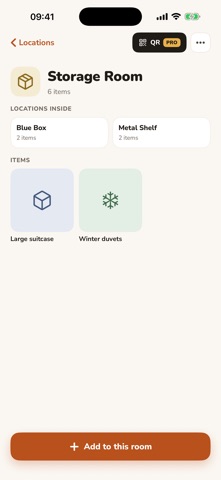
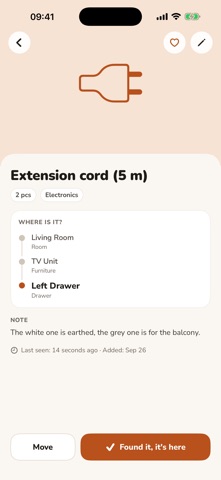
BUILD YOUR SPACES Create rooms, cabinets, shelves, drawers and boxes, and nest them as deep as you like. Every item knows its full path: Bedroom › Wardrobe › Top shelf › Blue box.
ADD ITEMS IN SECONDS Take a photo and Drawery suggests a name and a category for you, right on your device. Add quantity, notes, tags and a purchase date when you want the detail.
FIND ANYTHING One search field. Type part of a name, a tag or a room and get instant results with photos and the exact location.
FROM ANYWHERE ON YOUR IPHONE Your items show up in Spotlight, so you can search from the home screen without opening the app. Or just ask Siri where something is and it answers out loud.
QR LABELS Print a QR label for any box. Scan it with your camera and jump straight to its contents — no more opening five boxes to find one thing.
PRIVATE BY DESIGN Your inventory stays on your iPhone. Photo recognition runs on-device. No account, no tracking, no ads.
DRAWERY PRO • Unlimited items, locations and photos • iCloud sync across your devices • Family Sharing — Pro for up to five family members • QR labels for every location • PDF and CSV export • Every future Pro feature
The free version includes 20 items, 5 locations and 1 photo per item.
Pro is available as an annual subscription with a 7-day free trial, or monthly. Payment is charged to your Apple Account at confirmation. Subscriptions renew automatically unless cancelled at least 24 hours before the end of the current period. Manage or cancel in Settings › Apple Account › Subscriptions.
People rate it
Sign in to rate this app. Honest is what counts.
No ratings yet. Tried it? Be the first to rate it.