
Drill: Flashcards
Not claimedDrill is a flashcard app that schedules each card with spaced repetition, so you review…
By Nguyen Dinh Chung · EducationWhy we expect it: Clear value, thoughtful Anki import, offline study and a privacy-first design make it a compelling choice for flashcard fans.





About
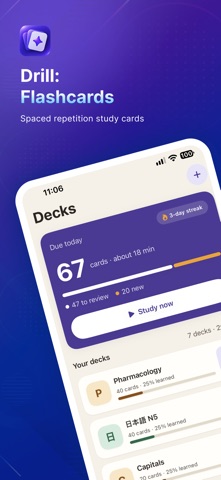
Drill is a flashcard app that schedules each card with spaced repetition, so you review a card right before you would forget it — not every day, not never.
BRING YOUR DECKS • Import .apkg files (Anki's export format). Decks, cards, images and your existing schedule come along. • Import the same file again later: cards you already have keep their schedule, edited cards get their new text, nothing is duplicated. • Turn text into cards: paste a list, a CSV, a Quizlet export or your Kindle highlights, and Drill reads the pairs. • Export everything as one zip and bring it back on another iPhone — schedules included. Or share a single deck as a file that opens straight in Drill. • Three sample decks, so you can try the app before importing anything.
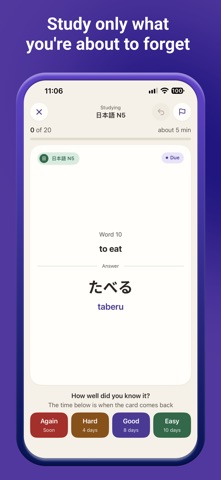
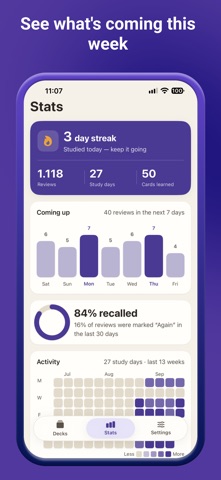
STUDY • Open the app, tap Study now: the first card is two taps away. • Again, Hard, Good, Easy — each button shows when you will see the card next. • Undo the last answer. Flag a card to come back to it later. • A daily reminder tells you how many cards are waiting — and stays quiet on days you have already studied. • Every answer is saved the moment you tap it. Quit mid-session, come back, and the same card is waiting. • The study day rolls over at 04:00, so a late-night session still counts for today. • Your streak, today's numbers, a forecast of upcoming reviews and a review heatmap. • Works entirely offline. No account. No ads. No server of ours.
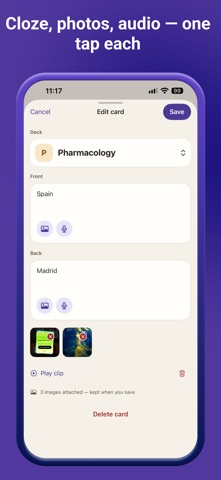
MAKE CARDS • Question and answer. Reversed pairs (one entry, two cards). Cloze deletions. A picture. A voice clip. • Or paste a passage — or pick a photo of a page — and let Drill draft question–answer cards on your iPhone with Apple Intelligence. Split a card that tries to say too much into smaller ones the same way. (Drill Pro; needs iPhone 15 Pro or later and iOS 26.)
DRILL PRO — one purchase, not a subscription • Unlimited decks (three without Pro; every deck you already have stays learnable). • Cards from a passage or a photo, on device. • Monthly stats, and a 91-day heatmap instead of 7. • A home-screen widget with your streak and the decks that are due, and a Live Activity that counts your session on the Lock Screen. • Session mode, per-deck daily limits, your own rollover hour, and the FSRS scheduler as an alternative to SM-2. • More than one picture per card.
Importing, exporting and studying — every card, every schedule — are always included.
Privacy Policy: https://primetruthteam.github.io/drill/privacy/ Terms of Use: https://www.apple.com/legal/internet-services/itunes/dev/stdeula/
People rate it
Sign in to rate this app. Honest is what counts.
No ratings yet. Tried it? Be the first to rate it.
More Education apps
Best new Education apps this week FluencyToolShadow a native Japanese sentence, hear your own voice back, and get scored.
 YoMoo: Read & Shadow JapaneseYoMoo turns real Japanese writing into graded reading practice: news articles, Wikipedia…
 KeyswingLearn music notes, rhythm and piano through playful practice in a magical forest.
 Uncle Math Homeschool - 6 to 8No Math Fear, Uncle Math Is Here
 Malachi SpeaksMalachi Speaks gives a voice to people who don't use speech
 SelvarisWatch evolution unfold in real time – on an entire planet