
Dump: Brain Dump & Reminders
Not claimedCapture everything
By Amonthep tanlaeo · ProductivityWhy we expect it: Clear, well-documented value: one-line capture, automatic sorting, plain-language reminders and offline backup make it a convenient daily tool.}




In short
Dump: Brain Dump & Reminders lets people type whatever is on their mind, one line at a time, and sorts each line into tasks, spending, appointments, health or ideas. It sets reminders from dates and times written in everyday Thai or English, and works offline with backups that carry over to a new phone. It stands out for its monthly bill tracking, where marking a bill as paid records the spending and moves it to the next cycle.
Summary by Debuts, based on the App Store listing.About
Capture everything. Stay on top.
Type whatever is on your mind, one line at a time. Dump sorts each line into tasks, spending, appointments, health or ideas, tells you what to do first, and sets reminders from the dates and times you wrote.
• Automatic sorting Type "Electricity bill 1,240 due Oct 5 every month" or "Coffee 65" and save. Dump sorts it into work, chores and errands, duties (like taxes), monthly bills, spending or appointments.
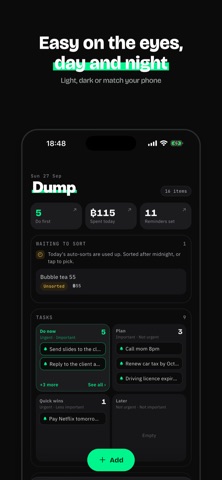
• Know what to do first Tasks land in four boxes: Do now, Plan, Quick wins and Later.
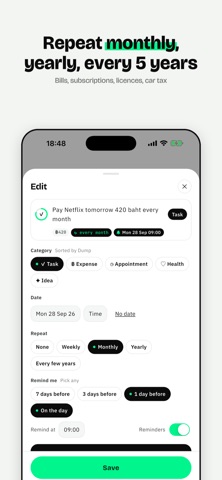
• Reminders from plain words Understands everyday Thai and English: "2pm", "weekdays", "every Mon and Wed", "next Monday". Remind 7, 3 or 1 day before or on the day, and repeat weekly, monthly, yearly or every few years, like a licence renewal.
• Spending and monthly insights A calendar of what you spent each day, your impulse share and bills coming up.
• Monthly bills Swipe a bill when it's paid. Dump records the spending and moves it to the next cycle.
• Add to your iPhone Calendar (optional) Change the date in Dump and the calendar event follows.
• Add spending from transfer slips (optional) Slips are read on your phone and never uploaded.
• Works offline, safe when you change phones Write anytime, even offline. Dump backs everything up, so a new phone gets it all back after you sign in.
Plans • Free: unlimited notes, 10 automatic sorts a day • Pro: 200 automatic sorts a day, live sorting while you type and full insights. Monthly or yearly; the yearly plan includes a 3-day free trial for new subscribers.
Payment is charged to your Apple ID. Subscriptions renew automatically unless cancelled at least 24 hours before the end of the period in Settings › Apple ID › Subscriptions.
People rate it
Sign in to rate this app. Honest is what counts.
No ratings yet. Tried it? Be the first to rate it.
More Productivity apps
Best new Productivity apps this week ChickMark: Habit TrackerChickMark is a simple habit tracker for routines, goals, and reminders
 Dayflint: One Thing a DayToo many priorities?
 Fristo CAFMFristo is the app for Fristo CAFM, the facility management software
- BeginAnywayMorning alarm for hard tasks: set one task, prove you started, build a streak
 DHUDEDHUDE Analityxs es la herramienta de gestión diaria para grupos de restauración y ocio…
 ScrollTime: Limit & ChallengesTikTok, Instagram, Facebook… ScrollTime helps you take back control of the time you…