
Easy Route Planner
Not claimedEasy Route plans a week of client visits and gives each vehicle an optimized route for…
By BB Tech Systems LLC · ProductivityWhy we expect it: The description clearly explains a useful weekly route planner with offline maps and thoughtful client management.



In short
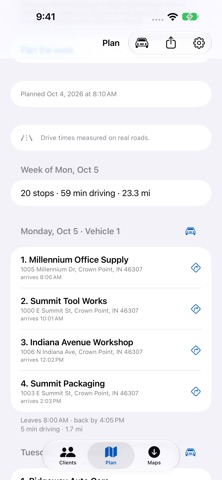
Easy Route Planner plans a week of client visits and builds an optimized route for each vehicle on every working day, starting and ending at a home base with arrival times at each stop. It is aimed at anyone who drives a weekly round of client visits, with one vehicle or several. It stands out for working offline once downloaded map data is in place, with drive times measured on real roads.
Summary by Debuts, based on the App Store listing.About
Easy Route plans a week of client visits and gives each vehicle an optimized route for every working day.
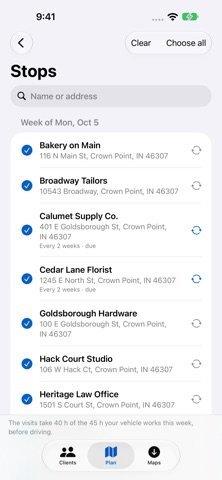
Choose this week’s stops, set your vehicles’ working days and hours, and tap Plan the week. Routes start and finish at your home base, with visits in order and arrival times at every stop.
It is for anyone who drives a weekly round of client visits, with one vehicle or several.
Plan the whole week • Plan for one vehicle or several. • Keep a separate saved plan for each week and return to it later. • Give each client a visit length, or use the typical visit from Settings. • Set repeat visits every 1 to 52 weeks. • See which stops could not fit and the reason each was left out.
Keep your clients organized • Search saved clients and stops by name or address. • Add clients by hand, from a CSV file, or from contacts you choose. • CSV files need a name and a full address. Headings are optional, and common column separators are supported. • Search for an address or enter its street, city, state and postal code separately. • Review and confirm locations before they are used for planning.
Plan on real roads, including offline Easy Route measures drive times on real roads. Planning downloads the map data your stops need. The Maps tab lets you check its size and download it ahead of time. Once the map data is downloaded, you can plan offline. Map data checks for updates while the app is open on Wi-Fi. Delete map data to make room while keeping your clients and saved weeks.
On the road Open a stop or a day in Apple Maps. A day fits up to fourteen visits plus the return to your home base in one link. Share a day or the whole week as text, including ordered stops, arrival times and map links.
One purchase.
Your client list is stored on your iPhone or iPad and is never sent to us. Routes are planned on the iPhone or iPad. There is no account, subscription or in-app purchase. Your app data can be included in your own iCloud backup.
Address searches and lookups use your phone’s address service. If you allow nearby search, an approximate area helps find nearby results. Client names, phone numbers, email addresses and notes are not sent with an address search. Map data comes from our server, which receives requests for map areas rather than client records.
Try with sample clients on the empty Clients tab to explore a planned week using invented businesses.
Map data © OpenStreetMap contributors
People rate it
Sign in to rate this app. Honest is what counts.
No ratings yet. Tried it? Be the first to rate it.
More Productivity apps
Best new Productivity apps this week ChickMark: Habit TrackerChickMark is a simple habit tracker for routines, goals, and reminders
 Dayflint: One Thing a DayToo many priorities?
- BeginAnywayMorning alarm for hard tasks: set one task, prove you started, build a streak
 DHUDEDHUDE Analityxs es la herramienta de gestión diaria para grupos de restauración y ocio…
 FTC BIOBUZZ Scorer & TrainerBIOBUZZ Scorer is a free, ad-free scorer for the 2026–2027 FTC season, built on…
 Intent - Scroll by ChoiceTake back control of your screen time