
Eport Journal
Not claimedEport Journal is a viewer for your daily work journal
By Pekka Ylenius · ProductivityWhy we expect it: Clear purpose, a careful privacy story, and a useful task view make this a promising niche tool.

In short
Eport Journal is a viewer for a daily work journal kept as plain Markdown files in a folder you choose, such as iCloud Drive. It shows open tasks across all days in one list, with where each task came from and a tap to tick it off, and it can search and add quick notes. It is aimed at people who keep a Markdown work journal and want to check tasks on the go. It has no account, collects no data, and makes no network requests.
Summary by Debuts, based on the App Store listing.About
Eport Journal is a viewer for your daily work journal. Its main use is checking your open tasks on the go: what is waiting on you, where each task came from, and ticking it off when it is done.
The journal is a folder of plain Markdown files that you create on your computer, separately from this app (for example with the open-source daily-journal tool). This app only reads those files from a folder you choose and makes small edits in place. It does not write the journal itself and has no AI features of its own.
ACTIONS Every open task across all days in one list. A task carried over for a week shows up once, with how long it has been waiting. Tap the circle to tick it off.
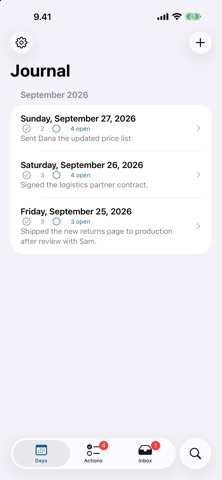
DAYS Every entry, grouped by month, with the number of things done and tasks still open.
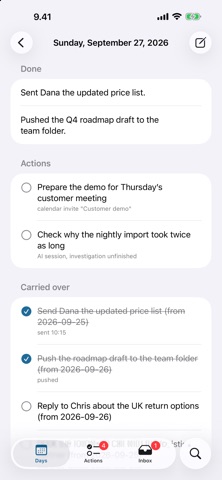
ENTRY Done, Actions and Carried over as clear rows. Every task shows where it came from — a mail, a chat thread, a meeting, a commit — with links you can open. The longer Details section is rendered as Markdown.
SEARCH Find anything you ever wrote down. Every word must match on the same line; case and accents are ignored.
INBOX Tap + to jot down a quick note or task. It is saved as a small file in your journal folder. Also available as a Shortcut.
YOUR FILES, YOUR FOLDER There is no account and no server. You choose a folder — for example in iCloud Drive — and the app reads and edits the Markdown files in place. Ticking a box changes exactly one character in the file, so the app never conflicts with your sync. The app collects no data and makes no network requests.
NO JOURNAL YET? Open the built-in sample journal to see how it works. The format and a free, open-source way to write the journal are at github.com/pylenius/daily-journal.
People rate it
Sign in to rate this app. Honest is what counts.
No ratings yet. Tried it? Be the first to rate it.
More Productivity apps
Best new Productivity apps this week ChickMark: Habit TrackerChickMark is a simple habit tracker for routines, goals, and reminders
 Dayflint: One Thing a DayToo many priorities?
 Fristo CAFMFristo is the app for Fristo CAFM, the facility management software
- BeginAnywayMorning alarm for hard tasks: set one task, prove you started, build a streak
 DHUDEDHUDE Analityxs es la herramienta de gestión diaria para grupos de restauración y ocio…
 ScrollTime: Limit & ChallengesTikTok, Instagram, Facebook… ScrollTime helps you take back control of the time you…