
Family Receipts
Not claimedReceipts keeps every receipt for your family in one place: household shopping, business…
By Robert Norton · FinanceWhy we expect it: A well-explained family receipt tracker with on-device reading and clear privacy-minded features, promising for a focused audience.




In short
Family Receipts keeps household and business receipts together, letting families scan, photograph, or email them in one place. It reads merchant, date, total and VAT on the iPhone itself, and each family member has their own account and receipt email address. Its standout feature is that totals convert to your currency using European Central Bank rates, unless you enter the amount your bank actually charged.
Summary by Debuts, based on the App Store listing.About
Receipts keeps every receipt for your family in one place: household shopping, business expenses and everything in between. Scan paper receipts, add photos and PDFs, or forward receipts by email, and Receipts reads the details for you.
CAPTURE IN SECONDS • Scan paper receipts with the document scanner, including multi-page ones • Take a photo, pick one from your library, or add a PDF from Files • Share PDFs and photos into Receipts from other apps • Forward emailed receipts to your own receipts address, or give it to shops
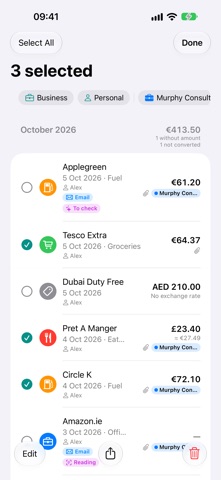
READ ON YOUR IPHONE • The merchant, date, total and VAT are read on your iPhone, not by an online service • Receipts suggests the category, personal or business, and the business, from what you've filed before • Anything that needs a second look waits in the Inbox under "Needs details" or "To check"
BUILT FOR FAMILIES • Start a new family in the app and invite the others with a code, or join your family with an invite code from its admin • Everyone has their own account • Roles decide who sees what: admins and family editors see all of the family's receipts, members see only their own • Each person gets their own email address for receipts; mail from senders they haven't approved waits for them in the Inbox • Connect the family's Microsoft 365 mailbox, or another email account using IMAP
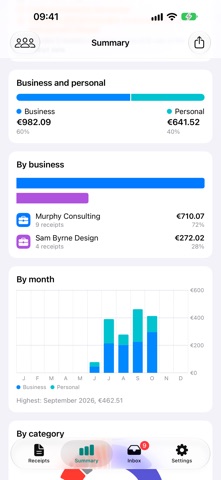
PERSONAL AND BUSINESS • Mark receipts as personal or business, and file business receipts under the right business • Each business gets its own email address for receipts • Your own categories, with any emoji or symbol as the icon
SEE WHERE THE MONEY GOES • Spending by category and by month, with charts • Filter by this month, this year or everything, by business, and personal against business • Search by merchant or notes
EVERY CURRENCY • Each receipt keeps its own currency • Totals in your currency, estimated with the European Central Bank rate on the receipt date • Enter what your bank actually charged, and that's used instead
EXPORT FOR YOUR ACCOUNTANT • Export a date range, or just the receipts you select, as a CSV file or a PDF report • Share any original receipt, exactly as it was captured
GET THINGS DONE QUICKLY • Select several receipts to change their type, business, category or payment method in one go, mark them checked, export or delete them, with Undo
SAFE AND PRIVATE • Originals are kept exactly as they arrived, safe on the Receipts server • Works offline; changes sync when you're back online • Lock the app with Face ID, Touch ID or your passcode • No ads, no tracking, no analytics • Delete your account in the app at any time
Receipts needs an account on the Receipts server. Create one in the app: start a new family and become its admin, or join your family with an invite code from its admin. To look around first, tap "Try the demo" on the sign-in screen.
People rate it
Sign in to rate this app. Honest is what counts.
No ratings yet. Tried it? Be the first to rate it.
More Finance apps
Best new Finance apps this week NjukiYour rent should do more than pay for where you live
 Inflation WatchInflation Watch turns official price data into plain English
 uOwe: Split Bills & BudgetuOwe keeps shared costs fair and your own money clear
 Debtless: Debt-Free by WhenYou are about to know when you will be free
 Pace: Daily Budget & SpendPace turns your monthly budget into one calm number: what you can spend today
 Spending ReviewSpending Review is the grocery total you keep with one hand, with the trolley in the…