
Faxlane: Send & Receive Fax
Not claimedSend and receive faxes from your phone
By MD. NASAR UDDIN REDOY · Productivity


About
Send and receive faxes from your phone. No fax machine, no phone line, no printer.
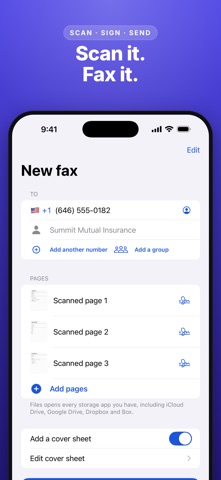
Faxlane turns your phone into a fax machine. Scan a document with the camera, pick a PDF, a Word file or a photo, and send it to any fax number in the US and 80+ countries. Follow each fax live on your Lock Screen and get a clear delivered or failed result, with a delivery receipt you can keep.
SEND A FAX IN SECONDS • Scan paper documents with automatic edge detection • Add PDFs and Word files from Files, photos from your library, or type a page • Share to Faxlane from any app • Add a cover page with a note • Send one fax to several numbers at once, or schedule it for later • Busy line or no answer? Faxlane tries again automatically • Follow each fax live on the Lock Screen and in the Dynamic Island • Failed faxes never use your pages
RECEIVE FAXES ON YOUR OWN NUMBER • Pick your own US or Canadian fax number with any plan • New faxes arrive in your Inbox with a notification • Pause receiving when you are away • Block unwanted senders. Faxes from blocked numbers never use your pages
ORGANIZE AND SIGN • Inbox, Sent, Outbox and Trash, with search and notes • Sign and fill any page, then fax it back • Import fax numbers from your contacts and make groups • Share faxes and delivery receipts as PDF
PRIVATE AND SECURE • Sign in with Apple, or use Faxlane without an account • Lock the app with Face ID • Back up every fax to your own iCloud Drive (Premium and up) • Choose how long faxes are kept. Delete your account and every fax at any time
FOR TEAMS • Business and Enterprise: invite your team with a link, share the fax numbers, pages and inbox, keep one shared contact list, and see who sent each fax
PLANS Choose a plan for your own fax number and pages: • Basic: 25 pages a week or 100 pages a month • Premium: 75 pages a week or 300 pages a month • Business: 700 pages a month, 2 numbers, 5 team members • Enterprise: 2000 pages a month, 5 numbers, 20 team members Pages you send and pages you receive both count. Some countries count each page as more than one page (up to 10); the app shows the exact count before you send. Need more? Page packs of 10, 25 or 50 pages never expire.
SUBSCRIPTION INFORMATION Plans are billed weekly, monthly or yearly. If a plan includes a free trial, the plan screen shows its length and the price that follows before you subscribe. Payment is charged to your Apple Account at confirmation of purchase. Subscriptions renew automatically unless turned off at least 24 hours before the end of the current period. Your account is charged for renewal within 24 hours before the end of the current period. Manage or cancel subscriptions in your App Store account settings. Any unused part of a free trial is forfeited when you buy a subscription.
Terms of Use: https://www.apple.com/legal/internet-services/itunes/dev/stdeula/ Privacy Policy: https://sites.google.com/view/faxlaneprivacypolicy/home Support: developer.nasar416@gmail.com
People rate it
Sign in to rate this app. Honest is what counts.
No ratings yet. Tried it? Be the first to rate it.