
FlagLine: Swim Team Timer
Not claimedONE TAP PER LANE Time up to six lanes at once with big lane buttons
By Witold Witkowski · Health and fitness




About
ONE TAP PER LANE Time up to six lanes at once with big lane buttons. Every tap is saved to disk before the screen reacts, so a locked phone or a closed app never costs you a split. Set up a practice or a race in seconds; the two are kept apart in History.
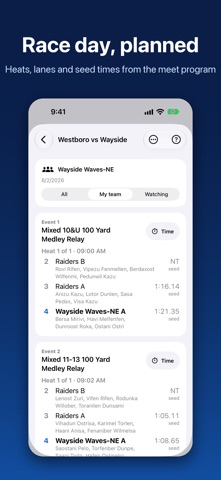
MEET DAY, PLANNED Import the Meet Program, the Heats and Lanes sheet, and the Meet Results PDFs (HY-TEK Meet Manager style), shared from your team's app or picked from Files. FlagLine finds your team's swimmers, builds a board of events, heats, lanes, and seed times, and joins the sheets for the same meet into one. Tap Time on any event to time it. Official results are kept beside your stopwatch times.
OFFLINE BY DESIGN Pool decks are loud, humid, and short on signal. FlagLine never asks for the internet: no server, no account, no network code at all. Timing, swimmers, meets, and history all work in Airplane Mode, so a flaky connection can't spoil a race.
COACHES, IN SYNC Pair two coaches' phones once: one shows a code, the other scans it, and both confirm the same six digits. After that, paired phones find each other by themselves. When one coach gets a race ready, the others see a Join button on any screen. Everyone can time every lane, and you see each other's splits as they happen. When two coaches tap the same swimmer, the first tap claims the lane, so there is one clean time per swimmer.
ROSTERS AND HISTORY, SHARED SECURELY A new assistant coach can ask a coach they trust for the swimmer list, plus history and meets if they like. Nothing is sent until the other coach says yes. Everything travels directly between the two phones over Bluetooth and Wi-Fi, signed and sealed, never through the internet.
ONE COACH, TWO DEVICES Use an iPhone and an iPad? Add your other device once, and your swimmers, history, and meets stay level between them whenever FlagLine is open on both.
MADE FOR PARENTS TOO Parents can import the program, star their swimmer, and see only that swimmer's events and heats. Share a good swim in one tap: FlagLine makes a card of a swimmer's meet results or season bests, ready to post or send to the family chat. Only that swimmer's own times are on it.
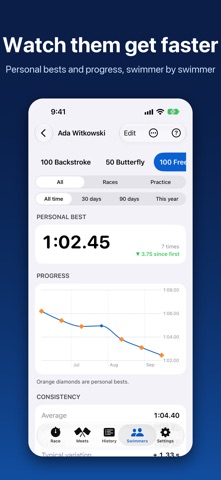
PROGRESS FOR EVERY SWIMMER Personal bests, progress charts, and consistency for each swimmer, with a progress report PDF and CSV export. Back up everything to a single file you control.
FRIENDLY FOR VOLUNTEERS A short tour on first launch (it can bring in your swimmers and profile from your other device) and a help button on every screen, for the volunteers who'll never read a manual. Works on iPhone and iPad.
PRIVATE BY DESIGN • FlagLine collects nothing. No account, no sign-in, no ads, no analytics, no third-party SDKs. • Swimmers' names and times stay on your devices. Children have no accounts or logins. • The app contains no code that connects to the internet. Sharing with other coaches uses Bluetooth and Wi-Fi directly between phones you have paired. • Optional Face ID lock that never engages in the middle of a race. • A swimmer's report or card contains only that swimmer's own times.
FlagLine costs a nominal price, paid once. That pays for the testing it takes to make a timer you can trust, and it means the app never has to earn its keep from kids' data.
People rate it
Sign in to rate this app. Honest is what counts.
No ratings yet. Tried it? Be the first to rate it.