
FlipStage: Present Two-Sided
Not claimedFlipStage splits one screen into two facing halves
By Baker Ventures LLC · Productivity

About
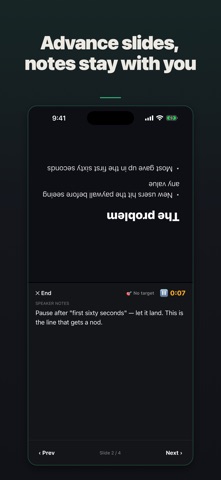
FlipStage splits one screen into two facing halves. The half pointing at the other person shows the current slide. The half pointing at you shows your speaker notes, a timer, and the controls.
What it does - Splits the screen into an audience half and a presenter half, the audience half turned 180 degrees so it reads upright from the other side - Keeps your speaker notes on your half only, in a pane you can scroll - Runs an elapsed timer you can pause, with optional targets of 5, 10, 15 or 20 minutes. The timer turns red once you pass the target you set - Moves through the deck with Prev and Next on your half - Starts from a four-slide sample deck, or import photos from your library as slides - Reorder slides, remove them, and type speaker notes on any slide before you start
What to know before you buy - The two-sided view opens when the window is taller than it is wide. On a phone that means holding it upright. - Decks are not saved yet. Photos you import, notes you type and any reordering last until you close the app. If you need a deck to survive a restart, wait for that update. - The audience half shows the slide and its position in the deck, nothing else from your notes. - No account and no network. Nothing you type or import leaves the device.
FlipStage does not film, record, or scroll text automatically. It puts a slide on one side and your notes on the other.
People rate it
Sign in to rate this app. Honest is what counts.
No ratings yet. Tried it? Be the first to rate it.