
Flustr: Voice to Text Keyboard
Not claimedFlustr is a voice keyboard and recorder that turns your speech into clean text in any…
By Resham Joshi · ProductivityWhy we expect it: Flustr offers private, offline voice dictation and meeting notes for free, with a clear, well-explained value proposition.


About
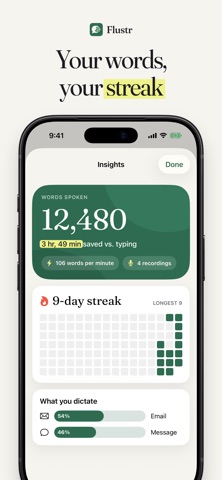
Flustr is a voice keyboard and recorder that turns your speech into clean text in any app on your iPhone, right on the device.
Instant dictation in any app Tap the mic on the Flustr keyboard, talk, and your words appear in Messages, Mail, Notes or any other text field.
Speak one language, send another Pick a language and Flustr writes what you say in it, translated on your iPhone into about 20 languages.
Meetings become minutes Record a meeting or lecture and get the transcript, a summary, meeting minutes and action items, even with the screen locked.
Private and offline Speech recognition runs on your iPhone and works in airplane mode, with no account, no cloud and no tracking.
Clean text, automatically Filler words and repeats disappear, and lists and emails come out formatted and ready to send.
Free, no account Every feature is included: no subscription, no in-app purchases, no word limit and no sign-up.
GOOD TO KNOW • Requires iOS 26 (iPhone 11 and newer) and a device passcode. • Clean-up, summaries and email polishing use Apple Intelligence (iPhone 15 Pro and newer, Apple Intelligence turned on). Transcription, translation and export work on every supported iPhone. • Full Access: the keyboard needs it only to exchange text with the Flustr app on your iPhone. Nothing is sent anywhere. • Microphone: iOS keyboards can't use the microphone, so the keyboard briefly opens Flustr to start listening. The orange dot shows when the mic is on. • One-time download of about 650 MB for the speech model (Wi-Fi recommended). Translation uses Apple's on-device language packs. • Live text while you speak: English, German and Spanish. Transcription understands 99 languages. • The keyboard's own keys are QWERTY or QWERTZ, without accented letters. • App languages: English, German and Spanish.
Flustr is free at launch. A paid plan, with a 7-day free trial for everyone who already has the app, is planned for a later version.
Privacy Policy: https://flustr.app/privacy
Questions? See the support link on this page.
People rate it
Sign in to rate this app. Honest is what counts.
No ratings yet. Tried it? Be the first to rate it.
More Productivity apps
Best new Productivity apps this week ChickMark: Habit TrackerChickMark is a simple habit tracker for routines, goals, and reminders
 Dayflint: One Thing a DayToo many priorities?
 Fristo CAFMFristo is the app for Fristo CAFM, the facility management software
- BeginAnywayMorning alarm for hard tasks: set one task, prove you started, build a streak
 DHUDEDHUDE Analityxs es la herramienta de gestión diaria para grupos de restauración y ocio…
 FTC BIOBUZZ Scorer & TrainerBIOBUZZ Scorer is a free, ad-free scorer for the 2026–2027 FTC season, built on…