
Focus Up: NFC App Blocker
Not claimedFocus Up blocks the apps that eat your day, and the only normal way to get them back is…
By Dalton Lundy · ProductivityWhy we expect it: Clear, memorable concept with well-explained value and a practical physical tag mechanic that genuinely stands out in productivity.


About
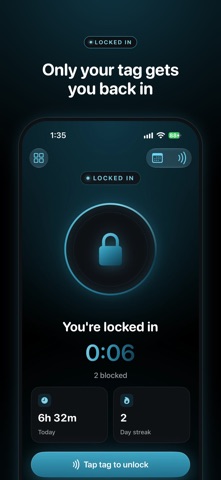
Focus Up blocks the apps that eat your day, and the only normal way to get them back is tapping an NFC tag.
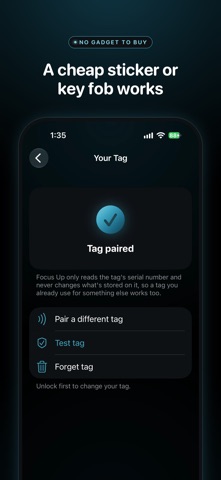
And it works with any generic NFC tag. You don't need a special device from us: a plain NFC sticker or key fob does the job, and a pack of stickers costs a few dollars online. You might already have one.
Put the tag somewhere inconvenient: on the fridge, in your car, in a drawer in another room. When you want back into a blocked app, you have to get up and go tap it. Most of the time you'll decide it isn't worth the walk, and that's the point.
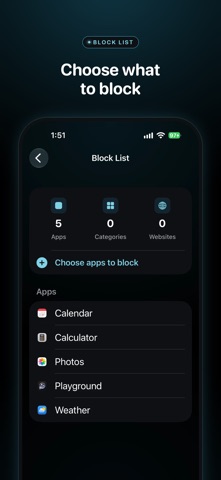
HOW IT WORKS 1. Pick the apps, categories and websites you want blocked. Focus Up uses Apple's Screen Time, so the block happens at the system level and closing Focus Up doesn't turn it off. 2. Pair your tag by holding your iPhone near it. 3. Tap Lock In. Blocked apps show a shield screen until you scan your tag again.
SCHEDULES Set times for your apps to lock on their own, like weeknights from 9 to 11 or 9 to 5 on workdays. Schedules run even when Focus Up is closed, and your tag can still end a lock early.
STATS See how long you've been locked today, your streak in days, your all-time total and a list of every finished session.
LOST YOUR TAG? You get 3 emergency unlocks a week. Each one makes you wait 15 minutes on a countdown screen, and leaving the app starts the wait over. It's there for real emergencies and annoying enough that you won't use it just to scroll.
WORKS WITH ANY NFC TAG Any generic NFC sticker, key fob or blank NFC card works, including the common NTAG213, NTAG215, NTAG216 and MIFARE tags. Focus Up only reads the tag's serial number and never writes to it, so a tag you already use for something else works too. Bank cards and transit cards won't work.
PRIVACY Focus Up doesn't collect any data. There's no account to make, and your block list, schedules and stats never leave your phone. Screen Time hides your app choices even from Focus Up; it only sees an anonymous token for each app.
REQUIREMENTS An iPhone with iOS 17 or later. Focus Up uses the iPhone's NFC reader, so it isn't available on iPad.
People rate it
Sign in to rate this app. Honest is what counts.
No ratings yet. Tried it? Be the first to rate it.