
Focusly: Pomodoro Timer
Not claimedFocus deeper
By Kubra Nur AKIN · Productivity

In short
Focusly: Pomodoro Timer is a focus timer built around the Pomodoro Technique, with classic and custom work and break cycles, ambient sounds, and a home screen widget. It is aimed at people studying, working, or handling any task that needs sustained attention. One notable feature is its iOS Live Activity support, which shows the timer in the Dynamic Island and on the Lock Screen.
Summary by Debuts, based on the App Store listing.About
Focus deeper. Get more done — one Pomodoro at a time.
Focusly is a completely free focus timer built around the proven Pomodoro Technique. Whether you're studying, working, or tackling any task that needs your full attention, Focusly helps you stay on track without distractions.
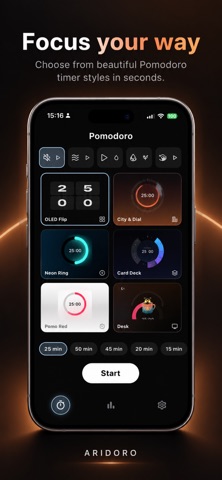
TIMER Follow the classic Pomodoro cycle: focus → short break → long break after a set number of sessions. Start, pause, resume, or reset with a single tap. Skip a phase when you need to, track completed sessions in real time, and get notified the moment a phase ends.
READY-MADE PROFILES Pick the rhythm that fits you:
Classic 25/5/20 Deep Focus 50/10/25 Flexible 45/10/25 Beginner 20/5/15 Mini 15/5/15 Every profile follows 4 focus sessions with one long break.
CUSTOM TIMERS Set your own focus, short break, and long break durations, and choose how many sessions until your long break. Your custom timer appears as a chip on the home screen — edit it anytime, delete with a long press, and undo if you change your mind.
6 BEAUTIFUL THEMES Choose from OLED Flip, City & Circle, Neon Ring, Card Deck, Pomo Red, and Desktop. Your theme is saved automatically and can be changed anytime from the timer screen.
AMBIENT SOUNDS Preview and pick from Silence, Waves, Rain, Relax, and Birds — looped seamlessly throughout your session.
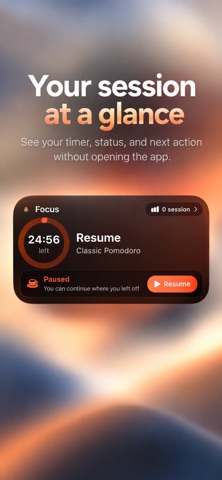
HOME SCREEN WIDGET & LOCK SCREEN Track your timer from the Dynamic Island and Lock Screen with iOS Live Activity. The home screen widget shows your remaining time, status, and today's session count at a glance. Pause or resume directly from the widget or Live Activity.
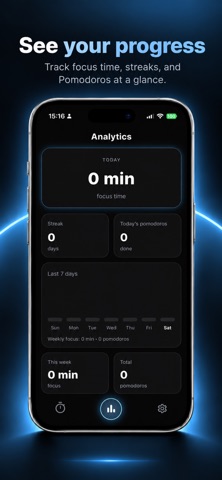
ANALYTICS See today's total focus time, your current streak, and how many pomodoros you've completed today and overall. Review your progress with a 7-day bar chart and a weekly summary.
Focusly is completely free. A short onboarding walks you through setting up widgets and Live Activity on first launch, and a built-in "How it works" guide explains the technique.
Ready to focus? Download Focusly and start your first Pomodoro session today.
People rate it
Sign in to rate this app. Honest is what counts.
No ratings yet. Tried it? Be the first to rate it.
More Productivity apps
Best new Productivity apps this week ChickMark: Habit TrackerChickMark is a simple habit tracker for routines, goals, and reminders
 Dayflint: One Thing a DayToo many priorities?
 Snappy Do ItSix connected modes. One traceable journey.
 Fristo CAFMFristo is the app for Fristo CAFM, the facility management software
 UhWhat? Voice NotesCatch the thought before it disappears
- BeginAnywayMorning alarm for hard tasks: set one task, prove you started, build a streak