
FocusStack: No Procrastination
Not claimedFocusStack helps protect deep work and see where the day actually went
By Vivek Wadate · Productivity



About
FocusStack helps protect deep work and see where the day actually went.
Launch your desktop workspace from iPhone, run focus sessions that block distractions, and review a private timeline of apps and sites — without another monthly subscription.
WHAT YOU CAN DO
• Launch Stacks from your phone One tap opens the apps and sites you need on your Mac or Windows PC and starts focus.
• Block distractions while you work During a focus session, FocusStack nudges you when you drift to apps or sites you’ve marked as distractions.
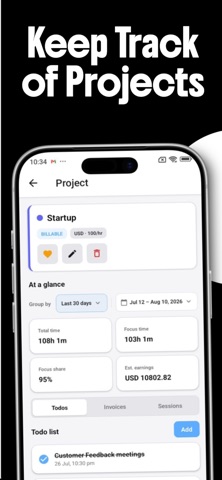
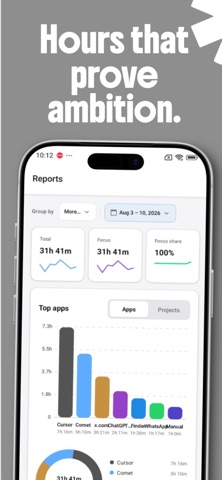
• See your real timeline Automatic tracking of foreground apps and websites — so “I was busy” becomes a clear picture of the day.
• Stay in control of your setup Pomodoro, custom, or unlimited focus. Bundle tools into Stacks. Review dashboard, calendar, and reports.
• Pay once, keep it Lifetime access. No feature gates. Built for freelancers, developers, designers, and indie founders — not team surveillance.
PRIVACY-FIRST FocusStack tracks foreground apps and site domains only. No keystrokes, mic, or camera. Your work stays yours.
HOW IT WORKS 1. Install FocusStack on your computer and stay signed in 2. Build Stacks for the work you do 3. Launch from iPhone or desktop, focus, then review your timeline
Download FocusStack and take back your day - one stack, one session, one honest timeline at a time.
People rate it
Sign in to rate this app. Honest is what counts.
No ratings yet. Tried it? Be the first to rate it.