
FPS: Find Photo Speedily
Not claimedFind a photo with a clue you remember: where or when you took it, a tag, a note, or…
By refactor979 Inc. · Photo and videoWhy we expect it: Clear, well-documented photo search that combines maps, dates, tags and on-device text recognition for a genuinely useful niche.



About
Find a photo with a clue you remember: where or when you took it, a tag, a note, or words in the image.
FPS searches your iPhone photo library. Your photos stay in your library, and FPS only reads them.
BROWSE PHOTOS ON A MAP See photos with location information grouped into photo pins. Tap a pin to browse photos taken there. Keep your place as you switch between the map and the list.
Search for a place or move the map to choose a location. Filter photos within a radius of 100 m to 100 km. When you choose a location on the map, moving the map updates the search around its new center. Location filters include only photos with location information.
SEARCH PHOTOS AND PLACES Use one search bar to search filenames, dates taken, tags, notes and recognized text, as well as places on Apple Maps. Select a place to move the map there.
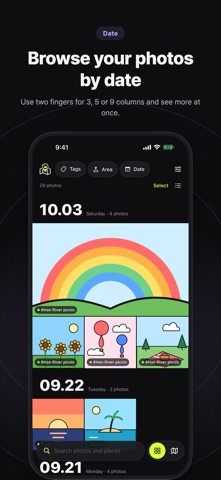
FILTER BY DATE Browse photos grouped by date. Choose a date range, Last 7 days, Last 30 days or This year, and filter for Favorites only. Use a two-finger gesture to switch between 3, 5 or 9 columns of thumbnails.
ADD TAGS AND NOTES Tag multiple photos at once. Create nested tags such as Travel/Beach. Select a parent tag to see photos with its subtags, too. Add notes with details you want to remember and search for them later.
SEARCH TEXT IN PHOTOS Select up to 30 photos and tap Recognize text to make Korean and English text in those photos searchable. You can also recognize text in a single photo from its detail view.
Text recognition runs on your iPhone. FPS uses only images already on your iPhone and doesn't download originals from iCloud.
BACK UP TAGS AND NOTES Save your tags and notes to a file and restore them later. Merge them with existing data or replace existing data with the backup. These backups contain tags and notes, not the original photos.
Tags and notes are stored in FPS and are deleted if you delete the app.
MAKE IT YOURS Choose from five app colors. FPS supports dark mode and larger text. No account required. Available for iPhone only, with iOS 17 or later.
People rate it
Sign in to rate this app. Honest is what counts.
No ratings yet. Tried it? Be the first to rate it.