
GameFlow Remote
Not claimedGameFlow Remote puts game-day control right in your hands
By Karen AYoung · Health and fitness


About
GameFlow Remote puts game-day control right in your hands.
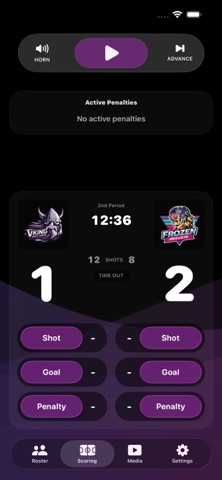
Connect your iPhone or iPad to GameFlow on your Mac over local Wi-Fi, then control the action from rink side. Run the clock, record shots and goals, manage penalties, update rosters, trigger media, play the horn and advance through each stage of the game without being tied to the scorer’s desk.
GameFlow Remote supports Quick, Comp and Pro games hosted by the GameFlow Mac app.
FEATURES
• Start, stop and adjust the game clock• Record goals, shots, penalties and timeouts• Select scorers and assists from team rosters• Add and edit players during the game• Control loaded video, image and audio media• Trigger playlists, team media and player media• Play the rink horn and advance game stages• Manage overtime and shootout action• View live scores, penalties and game status• Designed for both iPhone and iPad• Available in English, French, Swedish, Finnish and Czech
GameFlow Remote connects directly to the GameFlow host Mac over your local network. No customer account or internet connection is required during play.
REQUIREMENTS
GameFlow for macOS is required to host the game. Both devices must be connected to the same local Wi-Fi network. Enter the six-digit pairing code shown in GameFlow on the Mac to connect.
Run the game from wherever you have the best view of the ice.
People rate it
Sign in to rate this app. Honest is what counts.
No ratings yet. Tried it? Be the first to rate it.