
GarbageCollector: Disk Cleaner
Not claimedGarbageCollector finds the junk that quietly fills up your Mac and cleans it safely
By HAKAN OZGER · Utilities




In short
GarbageCollector: Disk Cleaner is a Mac utility that scans for junk files, leftovers from uninstalled apps, large forgotten files, and duplicates, then cleans them. It is aimed at Mac users who want to recover disk space. Every cleanup goes to a recovery vault first, so changes can be undone with one click.
Summary by Debuts, based on the App Store listing.About
GarbageCollector finds the junk that quietly fills up your Mac and cleans it safely. Nothing is ever deleted permanently by surprise: every file goes to a recovery vault first, and you can put it back with one click.
SMART SCAN One scan finds junk files, leftovers from apps you already removed, security issues, app updates and duplicate files, then shows how much space you can get back.
CLEANUP • App caches, logs and temporary files • Old installers (.dmg, .pkg) and archives you no longer need • Large files you forgot about • Leftover support files, caches and preferences from uninstalled apps • Caches of open apps are never selected automatically
APPS • Uninstall apps together with all of their related files • Spot apps you haven't opened in six months • See which apps have updates and open them in the App Store
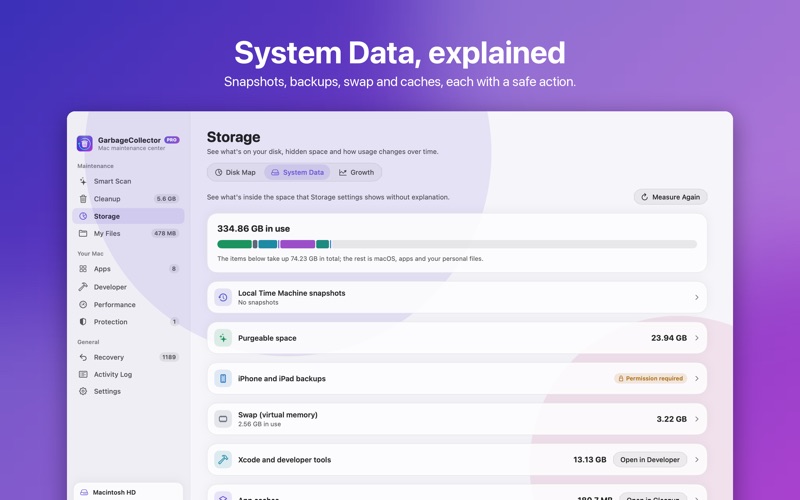
STORAGE • Interactive disk map to see what takes up space • “System Data” explained: backups, snapshots, mail and message attachments • Growth forecast that estimates when your disk will fill up
MY FILES • Find duplicate files by content, even if their names differ • Find similar photos and burst shots and keep the best one • Tidy messy folders like Downloads and Desktop by file type • Rules: “move PDFs older than 30 days to Documents”, written in plain words
PROTECTION • Check System Integrity Protection, Gatekeeper, Firewall and XProtect • Review login items and background services • Quarantine suspicious items safely
SAFE BY DESIGN • Recovery vault: undo any cleanup during the retention period • Activity log: see what was changed, when, and whether it was automatic • System files, Keychain, iCloud and Photos data are never touched • Everything happens on your Mac. No accounts, no tracking, no ads.
GARBAGECOLLECTOR PRO Scanning, manual cleanup, uninstalling apps and recovery are free. Pro adds: • Auto Clean and Auto Organize that run in the background • Rules for folders • Deleting duplicates and similar photos in bulk • Developer mode for old project dependencies and Xcode archives • Background protection, weekly summary and growth forecast
Pro is available as a monthly or yearly subscription with a one-week free trial, or as a one-time lifetime purchase. Payment is charged to your Apple Account at confirmation of purchase. Subscriptions renew automatically unless canceled at least 24 hours before the end of the current period. You can manage or cancel your subscription in your App Store account settings.
Terms of Use: https://www.apple.com/legal/internet-services/itunes/dev/stdeula/ Privacy Policy: https://hakanozger.com/apps/garbagecollector/privacy.html
People rate it
Sign in to rate this app. Honest is what counts.
No ratings yet. Tried it? Be the first to rate it.
More Utilities apps
Best new Utilities apps this week Drainly: Speaker CleanerMuffled speaker after a splash, rain, or a sweaty workout?
 Photo & PDF Resize: KBFile too large to upload?
 Arvectum Proxy LauncherArvectum Proxy Launcher is a network utility that routes your iPhone through a proxy you…
 Vodoalarm: vodostaji BiHVodoalarm javlja kad tvoja rijeka naglo raste, pa ne moraš stalno gledati vodostaje
 Screenshot Tidy: Sort & FindYou saved it
 Dusty: Photo Cleaner PetYour camera roll's new pet