
GetBored: App Blocker
Not claimedLet a spare moment stay a spare moment
By Orbioom LLC · ProductivityWhy we expect it: The description is thoughtful and honest about progress, with clear blocking features and a free, well-explained companion experience.

About
Let a spare moment stay a spare moment.
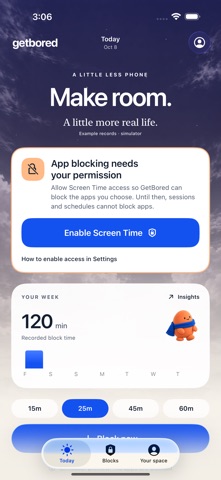
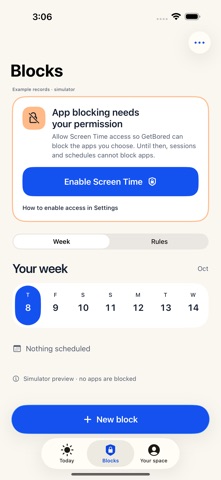
GetBored helps you set clear boundaries around distracting apps, then get on with your day. Enable Apple Screen Time access, choose apps, categories or websites, and use a timed session, a repeating schedule or a shared daily usage allowance.
CLEAR BLOCKS • See planned blocks in a seven-day timeline, including overnight windows and overlapping rules. • Check why an app is blocked, which session or rule is responsible and when it ends. • Save named session presets, extend an active session, plan breaks with automatic reblocking, and choose essential-app exceptions. • Optional commitment mode adds a deliberate pause before ending early. An emergency exit remains available. • Start saved sessions through widgets, Siri, Shortcuts or your Action Button. Live Activities show the session end time. Focus automation setup explains how to connect a preset through Shortcuts.
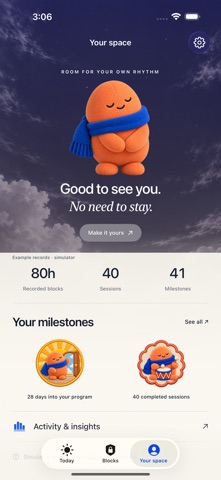
A COMPANION WHO CELEBRATES INDEPENDENCE Peb is a soft companion with automatic poses and illustrated scenes. Your space brings Peb, recorded-session totals and milestones together; the default sky changes gently through the day. Peb never needs feeding, check-ins or a streak. Explore 48 free milestone badges with direct numeric requirements and no deadline or streak loss.
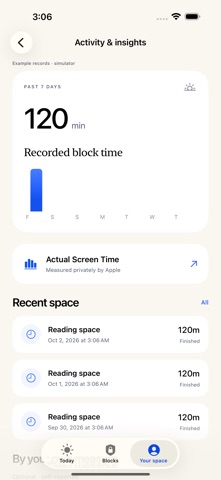
HONEST PROGRESS Recorded blocking duration is not time saved or proof that you stayed away from your phone. Breaks and early endings do not earn completed-session milestones. Actual Screen Time usage appears separately in Apple’s protected report. Optional practice and control measurements are labeled self-reported.
AN OPTIONAL PROGRAM WITH AN END Try a four-week practice program: identify familiar triggers, choose brief phone-down moments and notice urges. Reminders reduce over time and stop in the final week, giving you room to see what lasts without prompts. GetBored has not been clinically tested and does not claim to cure addiction, restore attention spans or guarantee results.
PRIVATE BY DEFAULT No account or advertising. Private records stay on your device. Optional Firebase Analytics starts only if you choose Allow analytics during onboarding or enable it in Settings. You can decline and use the app normally. Preview optional exports and diagnostics before sharing. Screen Time authorization is your choice and can be revoked in Settings.
FREE CORE, OPTIONAL PLUS Core blocking, schedules, daily allowances, all milestones and the complete optional program remain free. Plus adds private weekly comparisons, planned seven-day schedule coverage, session CSV exports and extra scenes. Monthly and yearly subscriptions provide the same features. The yearly plan bills the full annual total upfront. Both renew automatically until canceled through Apple. No trial or new one-time option is offered. Graduation does not cancel billing automatically.
Privacy: https://getbored-help.orbioomtech.workers.dev/privacy/ Purchase terms: https://getbored-help.orbioomtech.workers.dev/terms/ Apple standard license: https://www.apple.com/legal/internet-services/itunes/dev/stdeula/
People rate it
Sign in to rate this app. Honest is what counts.
No ratings yet. Tried it? Be the first to rate it.