
GlanceVNC
Not claimedConnect to your computers from your iPhone or iPad with GlanceVNC, a remote desktop app…
By Chris Russell · Utilities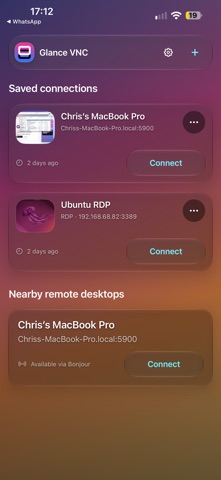

About
Connect to your computers from your iPhone or iPad with GlanceVNC, a remote desktop app for RDP, VNC and compatible Mac Screen Sharing servers.
CONTROL YOUR WAY Tap directly in Touch mode or move the pointer in Trackpad mode. Pinch to zoom in either mode. Trackpad mode follows the pointer across the enlarged desktop; Touch mode lets you tap the area you zoomed into. Switch modes without losing your zoom, use two fingers to scroll, and hold to drag. Simple built-in help explains each gesture.
YOUR COMPUTERS AT A GLANCE Save your connections for quick access, discover compatible VNC computers on your local network, and recognise recent sessions with desktop previews saved on your device. Personalise your home screen with a custom background. Review RDP server certificates in the app when approval is needed; a changed certificate requires a new review.
MADE FOR IPHONE AND IPAD A compact iPhone layout and spacious iPad cards keep your connections easy to reach. Use the on-screen keyboard or a compatible external keyboard and pointing device. Choose 16-bit or 24-bit colour for your next VNC connection. Enjoy clear panels on iOS 18 and Liquid Glass on iOS 26 and later, with layouts that adapt to landscape and larger text.
EXCHANGE CLIPBOARD TEXT Copy plain text from a compatible VNC, Mac Screen Sharing or RDP desktop to your device, or send device text to the remote clipboard. Open the expanded session toolbar to use Copy from remote or Paste to remote, then use the remote app’s Paste command to insert text.
KEEP YOUR CONNECTIONS WITH YOU Saved connection details sync through iCloud. Saved passwords use Apple Keychain and can sync through iCloud Keychain when available. Desktop previews and custom backgrounds stay on your device.
GlanceVNC requires a computer with a compatible RDP or VNC server, or Mac Screen Sharing enabled and a network connection that can reach it. Remote access outside your local network requires your own network setup. Requires iOS 18 or iPadOS 18 or later, including iOS and iPadOS 26.
People rate it
Sign in to rate this app. Honest is what counts.
No ratings yet. Tried it? Be the first to rate it.