
Glucose Logbook - Insulin Log
Not claimedGlucose Logbook keeps your blood sugar readings in a log sheet laid out like a paper…
By RAINBOW TREE LLC · Health and fitnessWhy we expect it: The description clearly explains a practical paper-style logbook that patients can show their doctors.



In short
Glucose Logbook - Insulin Log records blood sugar readings on a log sheet laid out like a paper logbook, with weekly pages, meal-time columns, weight, steps, blood pressure and notes. It is for people who check their glucose at home and want to show or print the sheet for their doctor. Records stay on the device, and HI or LO readings are kept out of averages but counted on the sheet.
Summary by Debuts, based on the App Store listing.About
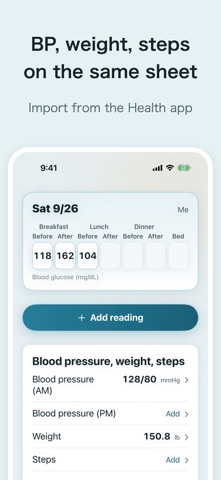
Glucose Logbook keeps your blood sugar readings in a log sheet laid out like a paper logbook: one week per page, with before and after columns for breakfast, lunch and dinner, bedtime, then weight, steps, blood pressure (AM/PM) and notes. At appointments you can show that sheet, or print it.
ADD READINGS • Add reading opens with the column closest to the current time already selected. Enter the value and save. • If your meter shows HI or LO, enter it as is. It's left out of the averages, and the sheet notes how many there were. • A second reading in the same column goes into that day's notes with its time. • Mark lows and add notes. • Copy entries from a paper logbook by tapping empty cells on the log sheet.
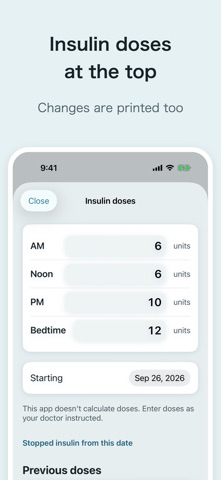
INSULIN DOSES • Enter your usual doses (AM, Noon, PM, Bed) and a start date, and they're printed at the top of the sheet, including the date they changed. • A different dose on one day goes into that day's notes. • This app doesn't calculate doses. Enter them as your doctor instructed.
BLOOD PRESSURE, WEIGHT, STEPS • Enter them yourself or import them from the Health app (read only; nothing is written to Health).
LOG SHEET AND TRENDS • The on-screen log sheet has the same layout as the paper. Weekly averages and counts are worked out for you. • Trends overlays the values of the columns you choose.
SHEET FOR YOUR DOCTOR (PRO) • Choose the period (this week, 1 month or any dates) and the paper size (US Letter or A4), then print, AirDrop or email it. • Previewing the latest page is free.
ALSO • Reminders for reading times and for the evening before appointments • Family logs (from the second person, Pro) • CSV export (opens in Excel) and backups for switching phones • Units: mg/dL or mmol/L, kg or lb
PRICING • Logging, the log sheet, trends, reminders, Health import and CSV export are free. • Pro is a one-time purchase, not a subscription: the sheet for your doctor and family logs.
YOUR DATA • Your records are stored only on your device. No account is needed. No ads.
PLEASE NOTE • This app is a logbook for recording values you check at home and showing them to your doctor. It does not diagnose, treat or give medical advice, and it does not judge whether values are good or bad. • If anything concerns you, take your log to your doctor.
People rate it
Sign in to rate this app. Honest is what counts.
No ratings yet. Tried it? Be the first to rate it.
More Health and fitness apps
Best new Health and fitness apps this week Orbit: Self-Care Habit TrackerYour healthy choices deserve more than a checkmark
 Wellbeing: Digital WellbeingBillions of people spend more time scrolling than they want to
 Padel Score Tracker: PacoKeep padel score on your Apple Watch without looking at it
 DeskFlow: Workday MovementYou don't need another workout app
 Vigia: meds & family healthVigia keeps your health and your family's in order: a child, a parent, a partner
 Pinfall: Bowling StatsPinfall is the bowling score tracker for league bowlers who want to get better, not just…