
Golf Counter: Score & Putts
Not claimedGolf Counter counts your golf strokes on Apple Watch
By tomople · Health and fitnessWhy we expect it: A focused, free golf stroke counter with careful offline saving, partner scoring and clear battery notes makes a convincing, well-described debut.



About
Golf Counter counts your golf strokes on Apple Watch. Counting, putts, penalties, courses and pars, the scorecard, playing partners and sharing are all free to use. No sign-up, no login.
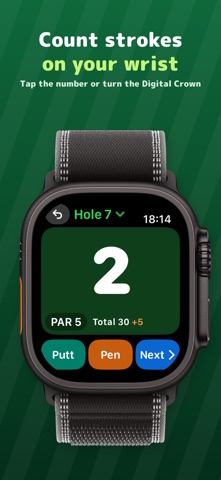
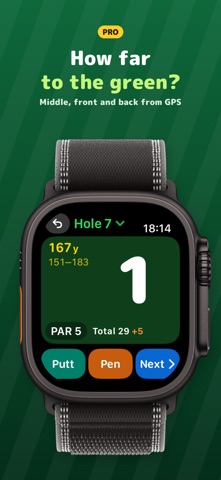
ONE TAP PER STROKE Tap the big number for a stroke, or turn the Digital Crown — it works with a glove on. Putts and penalties have their own buttons, and "−1" takes back only the last press. On Apple Watch Series 9, Ultra 2 or later you can also double tap.
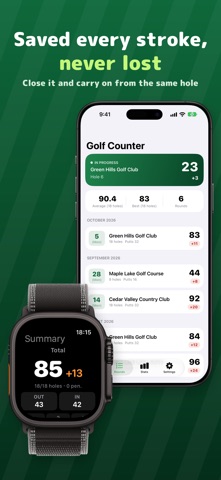
YOUR ROUND IS NEVER LOST Every stroke is saved the moment you press. If the app closes or the watch goes back to the clock, open it again and you are on the same hole with the same count. A new round is always a new record, so an older round is never overwritten.
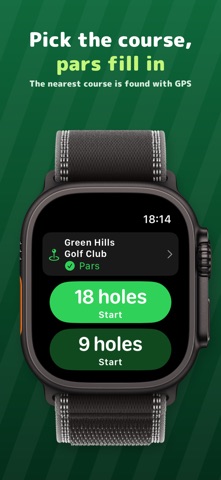
PARS FILL IN BY THEMSELVES The nearest course is found with GPS and picked for you. On courses with known pars, all 18 pars are there from the first tee. On a course with no data, play it once and the pars are there next time. Clubs with three or more nines let you choose the front and back nine.
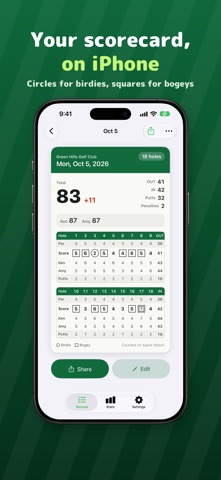
SCORECARD ON IPHONE Strokes counted on the watch arrive on iPhone by themselves. Review them on a scorecard with circles for birdies and squares for bogeys, and share it as a picture. Finished rounds can be fixed hole by hole on iPhone.
PLAYING PARTNERS Add up to three partners. When you tap Next at the end of a hole, the watch asks for their scores, already set to par, so most holes need one or two taps.
EASY ON THE BATTERY No heart rate or motion sensors are used, and GPS only while the app is on screen. To keep the counter on screen for the whole round, turn on Record as workout; the round is also saved to Health as a Golf workout (it uses more battery).
ONE TAP FROM THE WATCH FACE Put the complication on your watch face to open the counter with one tap. During a round it shows the hole and your score.
STATS Your average and best score and putts per round at a glance.
GOLF COUNTER PRO (IN-APP PURCHASE, ONE-TIME) The following features need the in-app purchase Golf Counter Pro. You pay once; it never renews. - Distance to the green on Apple Watch: middle, front and back - After you hole out, the next hole comes up by itself when you reach the next tee - Swing counting (beta): full swings are counted by themselves, swings from the same spot count once, putts are added by hand - Detailed stats: score trend, par 3 / 4 / 5 averages, greens in regulation, birdie and bogey rates - CSV export of every round On a new device, use Restore purchase in Settings.
PRIVACY Your scores stay on your Apple Watch and iPhone and are never sent anywhere. No ads. After a round on a picked course, only that course's pars and the places of its tees and greens are shared, without any personal information (you can turn this off in Settings).
Course data © OpenStreetMap contributors (ODbL)
People rate it
Sign in to rate this app. Honest is what counts.
No ratings yet. Tried it? Be the first to rate it.