
Honeyday
Not claimedFor the people and moments you love: birthdays and anniversaries from your contacts, in…
By Missaq Ataschi · LifestyleWhy we expect it: Clear value, thoughtful details and smart syncing make Honeyday a strong debut for anyone who tracks important dates.



About
For the people and moments you love: birthdays and anniversaries from your contacts, in a widget and with reminders. iPhone, iPad, Mac.
Birthdays, anniversaries and the evening you first met. Most of them are already in your contacts, and you add the rest yourself.
Home Screen
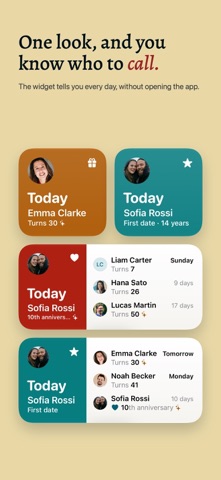
The widget tells you every day, without opening the app. Small, medium or large, and on the Lock Screen too. At midnight it moves on to the next day by itself.
On ordinary days it stays calm. On the day itself it lights up in the colour of the occasion, and round birthdays and anniversaries get a little sparkle.
Your contacts
The birthdays and anniversaries in your contacts show up right away, sorted by who is next. Honeyday never changes a contact on its own. If a date is wrong, you fix it right in Honeyday on iPhone and iPad, or with one click in Contacts on the Mac, and the list follows.
Days that belong to no contact you add yourself: the day you moved in together, the dog’s birthday, your first date.
iPhone, iPad and Mac
Honeyday is a real app on each of them, with the list and the details side by side on the iPad and the Mac. What you decide in it, like who you want to be reminded about or a note for a gift idea, syncs through your own iCloud.
A reminder arrives on the day at the time you choose, and a few days before if you want time to find a present.
A few more things
People rate it
Sign in to rate this app. Honest is what counts.
No ratings yet. Tried it? Be the first to rate it.